
AWS Glue is a serverless data integration service for discovering, preparing, transforming, and moving data. It is commonly used in data lake pipelines where raw files land in Amazon S3, metadata is registered in the AWS Glue Data Catalog, transformations run through Glue ETL jobs, and the cleaned data is queried by services such as Amazon Athena, Amazon EMR, or Amazon Redshift Spectrum.
This post walks through the core Glue building blocks: the Data Catalog, crawlers, classifiers, databases, tables, partitions, ETL jobs, DynamicFrames, triggers, and a practical CSV-to-Parquet pipeline pattern.
What Is AWS Glue?
AWS Glue is AWS’s managed ETL and data integration service. Instead of provisioning and managing Spark clusters ourselves, we define metadata, jobs, scripts, schedules, and triggers, then Glue runs the processing infrastructure for us.
Glue is useful when we need to:
- Discover schema from files or databases
- Catalog datasets in a centralized metadata store
- Convert raw data into analytics-friendly formats
- Move data between sources and targets
- Run Spark-based ETL without managing servers
- Build pipelines that can run on demand, on a schedule, or after events
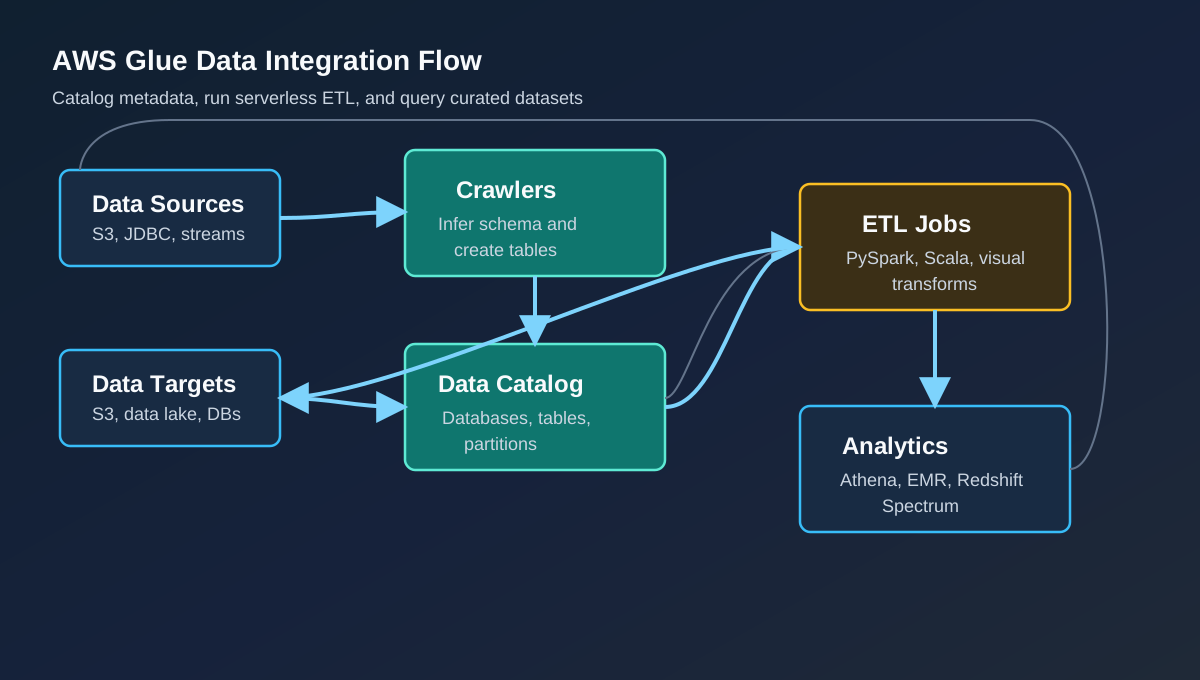 AWS Glue connects data sources, metadata, ETL jobs, and analytics services
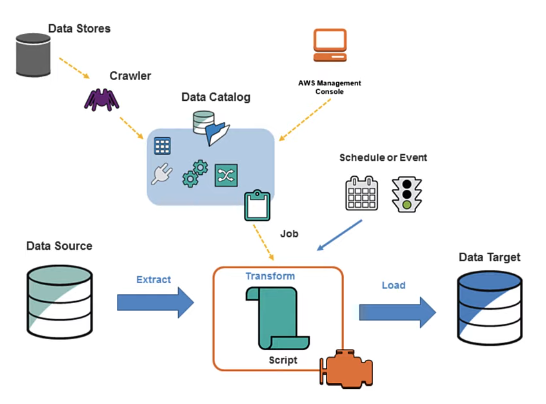 Glue Data Catalog, jobs, scripts, and scheduling from the original Notion page
At the center of Glue is the AWS Glue Data Catalog. Jobs, crawlers, Athena, EMR, and other analytics services can use the catalog to understand where data lives and what shape it has.
The Glue Data Catalog stores metadata. The actual data stays in its source system, such as S3, RDS, Redshift, or another supported store.
Why Use AWS Glue?
The main reason to use Glue is to reduce operational overhead in ETL pipelines. We can focus on datasets, transformations, permissions, and pipeline behavior while AWS handles the managed processing environment.
Glue is especially helpful for data lake workflows:
- Raw data lands in S3.
- A crawler infers schema and creates catalog tables.
- An ETL job reads from the catalog.
- The job transforms, cleans, or repartitions the data.
- Output is written back to S3, often as Parquet.
- Athena or another analytics engine queries the curated data.
This makes Glue a natural fit for bronze, silver, and gold data lake patterns.
Populating the Data Catalog
The prerequisite for most Glue ETL jobs is a populated AWS Glue Data Catalog. In the Notion notes, the catalog is populated with crawlers:
- A crawler connects to a data store such as S3.
- Built-in or custom classifiers inspect the files.
- Glue infers the schema and creates metadata in the Data Catalog.
- The crawler can run on demand, on a schedule, or after an event.
The crawler determines table structure and partitions, but it does not model relationships between tables like a relational database design tool. Its job is to make datasets discoverable and queryable by Glue, Athena, EMR, and other services.
Core AWS Glue Components
| Component | Purpose |
|---|---|
| Data Catalog | Persistent metadata store for databases, tables, schemas, partitions, and connections |
| Crawler | Scans a data store, infers schema, and creates or updates catalog tables |
| Classifier | Determines the format and schema of data, such as CSV, JSON, XML, or Parquet |
| Database | Logical grouping of related catalog tables |
| Table | Metadata definition that represents a dataset |
| Partition | Logical slice of a table, usually mapped to folder paths in S3 |
| Job | ETL logic that reads, transforms, and writes data |
| Trigger | Starts jobs or crawlers on demand, on a schedule, or after another event |
| Workflow | Orchestrates multiple jobs, crawlers, and triggers |
| DynamicFrame | Glue’s schema-flexible data abstraction for ETL workloads |
The AWS Glue Data Catalog
The Glue Data Catalog is a regional metadata repository. It contains definitions for databases, tables, partitions, connections, and other control information used by Glue jobs and analytics services.
A Glue database is a logical container. It does not hold data by itself. It simply groups related table definitions.
A Glue table represents the schema and location of a dataset. For example, a table might describe a CSV dataset in S3:
- Column names
- Data types
- File format
- S3 location
- Partition keys
- Compression details
- Classification metadata
The table is metadata only. The rows still live in the S3 bucket or source database.
Crawlers and Classifiers
Before a Glue job can reliably process a dataset through the catalog, the catalog needs metadata. A crawler is the common way to populate that metadata.
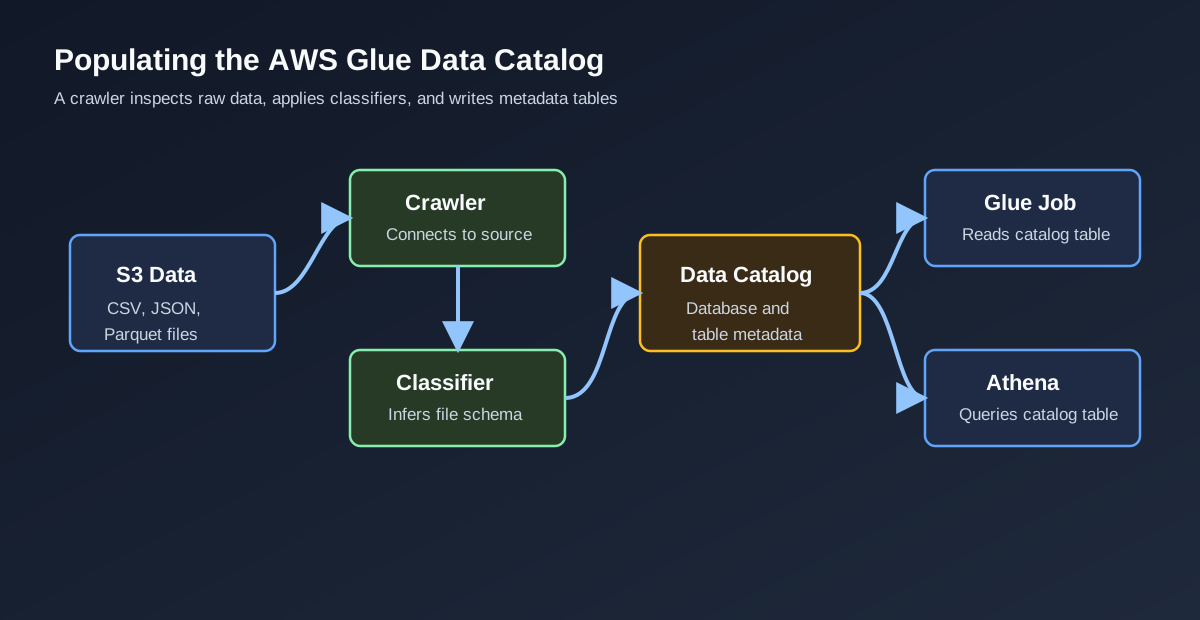 Crawlers classify data, infer schema, and write table metadata to the Data Catalog
When a crawler runs, it:
- Connects to the data store.
- Applies custom classifiers, if configured.
- Falls back to built-in classifiers when needed.
- Infers schema, format, and partition information.
- Creates or updates tables in the Data Catalog.
Glue provides built-in classifiers for common formats such as CSV, JSON, XML, Apache Avro, and Parquet. Custom classifiers are useful when the source data has special formatting rules.
Crawlers infer schema and partitions, but they do not discover business relationships between tables. Those relationships still come from data modeling and domain knowledge.
S3 Folder Layout for a Glue Demo
A simple Glue learning setup can use one S3 bucket with separate prefixes for raw data, scripts, temporary files, and output:
1
2
3
4
5
6
7
8
9
10
s3://example-glue-lab/
  data/
    customer_database/
      customers_csv/
        dataload=2021-12-30/
          customer.csv
  scripts/
  temp-directory/
  curated/
    customers_parquet/
The exact folder names are not mandatory, but the separation is useful:
data/stores source files.scripts/stores generated or custom Glue scripts.temp-directory/gives Glue a working path.curated/stores transformed output.
For partitioned datasets, prefer folder keys such as dataload=2021-12-30/. This Hive-style layout makes the partition name and value explicit, which improves interoperability with Glue and Athena.
IAM Role for Glue
Glue jobs and crawlers need an IAM service role. That role should allow Glue to access only the S3 locations, logs, catalog actions, and source or target services required by the pipeline.
For a learning lab, it is tempting to attach broad administrator permissions. That is convenient, but it is not a good habit. A safer role usually includes:
- Permission to read the source S3 prefix
- Permission to write the output, script, and temporary prefixes
- Permission to write CloudWatch Logs
- Permission to read and update the Glue Data Catalog
- Permission to connect to required sources, if using JDBC or VPC connections
Avoid public bucket policies and wildcard administrator roles in real projects. Glue can be learned with narrow S3 and Glue permissions, and production pipelines should use least privilege.
Partitions in Glue
Partitions are one of the most important concepts in S3-backed analytics.
In S3, partitions are often represented as folders:
1
2
s3://example-glue-lab/data/customer_database/customers_csv/dataload=2021-12-30/
s3://example-glue-lab/data/customer_database/customers_csv/dataload=2021-12-31/
In the Data Catalog, those folders become partition values on a table. If the partition key is dataload, queries can filter by that key:
1
2
3
SELECT *
FROM customers_csv
WHERE dataload = DATE '2021-12-30';
That filter allows engines such as Athena to skip unrelated S3 prefixes. Good partition design can reduce query cost and improve performance.
Do not over-partition, though. Tiny partitions and tiny files can make data lakes slower and harder to manage. Partition by fields that are frequently used in filters, such as load date, event date, region, tenant, or business domain.
Glue ETL Jobs
A Glue job contains the business logic for the ETL process. It defines:
- Source data
- Target data
- Script location
- IAM role
- Worker configuration
- Job parameters
- Temporary directory
- Monitoring and retry settings
Glue can generate a script from a visual job, or we can write the script ourselves in PySpark or Scala. In many real projects, the generated script is a starting point, and the production version is maintained in source control.
DynamicFrames vs Spark DataFrames
Glue jobs often use DynamicFrames. A DynamicFrame is similar to a Spark DataFrame, but it is designed for messy ETL data where schema can vary across records.
DynamicFrames are helpful when:
- Source data is semi-structured
- Some fields contain inconsistent types
- We need Glue transforms such as
ApplyMapping - We want to read directly from the Data Catalog
Spark DataFrames are still useful for SQL-style transformations, joins, aggregations, and performance tuning. Glue lets us convert between DynamicFrames and DataFrames when needed.
Demo Pipeline: CSV to Parquet
A common Glue demo is converting raw CSV data into Parquet for analytics.
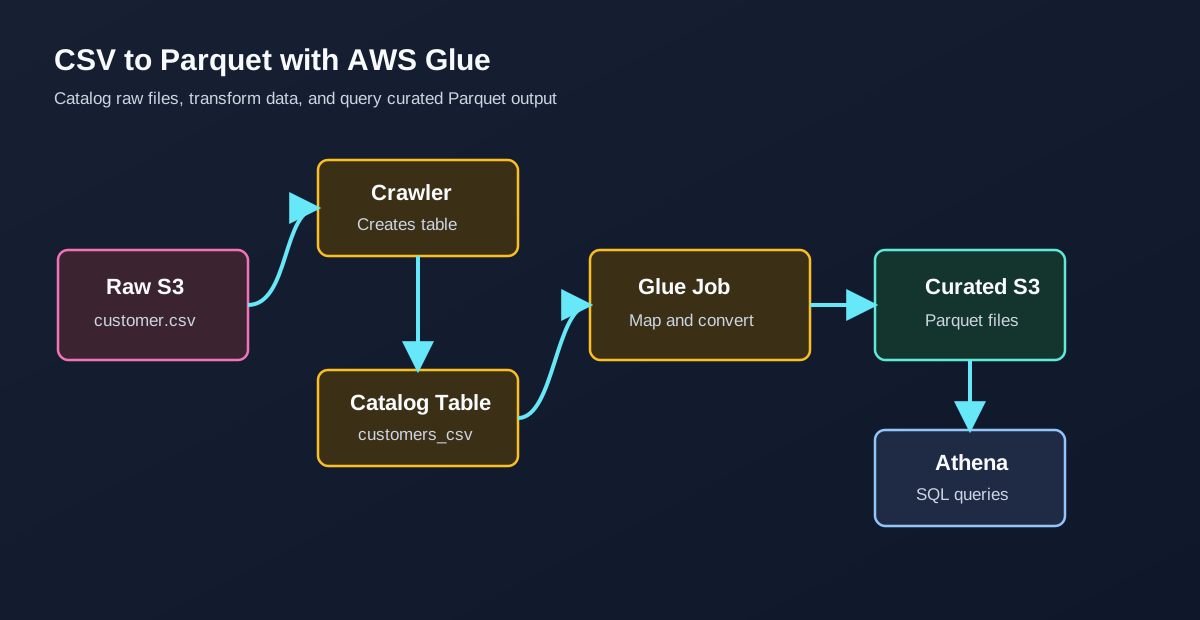 A crawler catalogs CSV data, a Glue job transforms it, and Athena queries the Parquet output
The workflow looks like this:
- Upload
customer.csvinto a raw S3 prefix. - Create a Glue database such as
customer_database. - Create a crawler pointed at the raw CSV prefix.
- Run the crawler to create a catalog table.
- Create a Glue ETL job using that catalog table as the source.
- Map, clean, rename, or cast columns.
- Write the output to an S3 target prefix in Parquet format.
- Crawl the Parquet output or create the table manually.
- Query the curated table from Athena.
Parquet is a good target format for analytics because it is columnar, compressible, and efficient for selective queries.
Simplified PySpark Glue Job
The exact script generated by Glue depends on the console choices, but a simplified version of a catalog-to-Parquet job looks like this:
1
2
3
4
5
6
7
8
9
10
11
12
13
14
15
16
17
18
19
20
21
22
23
24
25
26
27
28
29
30
31
32
33
34
35
36
37
38
39
40
41
42
import sys
from awsglue.context import GlueContext
from awsglue.dynamicframe import DynamicFrame
from awsglue.job import Job
from awsglue.transforms import ApplyMapping
from awsglue.utils import getResolvedOptions
from pyspark.context import SparkContext

args = getResolvedOptions(sys.argv, ["JOB_NAME", "OUTPUT_PATH"])

sc = SparkContext()
glue_context = GlueContext(sc)
job = Job(glue_context)
job.init(args["JOB_NAME"], args)

source = glue_context.create_dynamic_frame.from_catalog(
    database="customer_database",
    table_name="customers_csv",
)

mapped = ApplyMapping.apply(
    frame=source,
    mappings=[
        ("customer_id", "string", "customer_id", "string"),
        ("first_name", "string", "first_name", "string"),
        ("last_name", "string", "last_name", "string"),
        ("email", "string", "email", "string"),
        ("dataload", "string", "dataload", "string"),
    ],
)

glue_context.write_dynamic_frame.from_options(
    frame=mapped,
    connection_type="s3",
    connection_options={
        "path": args["OUTPUT_PATH"],
        "partitionKeys": ["dataload"],
    },
    format="parquet",
)

job.commit()
This example reads from a catalog table, applies an explicit mapping, and writes Parquet output partitioned by dataload.
In a production job, we would add validation, data quality checks, error handling, logging, retries, and observability around row counts and schema changes.
Triggers and Workflows
Glue jobs can run manually, but pipelines usually need automation. Glue triggers can start jobs and crawlers:
- On demand
- On a schedule
- After another job or crawler event
A scheduled trigger might run a nightly CSV-to-Parquet job. An event-style dependency might run a second job only after the first job succeeds.
For multi-step pipelines, Glue workflows help coordinate crawlers, jobs, and triggers as a single pipeline graph. This is useful when the process has stages such as:
- Crawl raw data.
- Transform bronze to silver.
- Run data quality checks.
- Transform silver to gold.
- Crawl curated output.
- Notify downstream consumers.
Development and Testing
Older Glue material often mentions development endpoints. The more modern path for interactive development is AWS Glue interactive sessions, which let us use notebooks and local Jupyter kernels with Glue’s serverless Spark infrastructure.
In the original notes, a Glue development endpoint is described as an environment for developing and testing Glue scripts from a local machine or terminal without creating a full Glue job each time. The important warning is cost: development endpoints can be expensive if left running.
For day-to-day development:
- Keep Glue scripts in version control.
- Use job parameters instead of hardcoded bucket names.
- Test transformations on small sample datasets.
- Use separate buckets or prefixes for dev, test, and production.
- Watch CloudWatch Logs and Glue job metrics after every run.
Practical Best Practices
For a cleaner Glue setup:
- Use least-privilege IAM roles.
- Keep raw, temporary, script, and curated paths separate.
- Prefer Parquet or another analytics-friendly format for curated zones.
- Use partition keys that match common query filters.
- Avoid many tiny files.
- Store scripts in source control, even if Glue generated the first version.
- Monitor job duration, retries, failures, and data volume.
- Treat crawler schema changes carefully in production.
Summary
AWS Glue brings together cataloging, crawling, Spark-based ETL, job scheduling, and pipeline orchestration in a managed service. The key idea is simple: catalog the data, transform it with jobs, write it in an analytics-friendly layout, and let downstream tools query the curated result.
Once the Data Catalog, crawler behavior, S3 layout, partitions, IAM role, and job script are clear, Glue becomes a practical foundation for data lake pipelines on AWS.
Source Notes
Based on my Notion notes: Amazon Glue.