
Amazon RDS, short for Amazon Relational Database Service, is AWS’s managed service for running relational databases in the cloud. Instead of installing database software on an EC2 instance and managing the operating system, patching, backups, and failover ourselves, RDS gives us a managed database environment where AWS handles much of the operational work.
This post walks through the fundamentals of RDS: supported database engines, storage choices, Multi-AZ deployments, backups, manual snapshots, encryption, billing, and the practical steps involved in creating and connecting to an RDS database.
Why Amazon RDS Exists
Running a relational database involves more than creating tables. In a self-managed database environment, we must handle:
- Server provisioning
- Operating system patching
- Database software installation
- Database engine patching
- Backups
- Restore testing
- Monitoring
- High availability
- Failover
- Storage growth
RDS simplifies this by providing a managed database service. AWS takes care of common administrative tasks, while we continue to own the database design and application behavior.
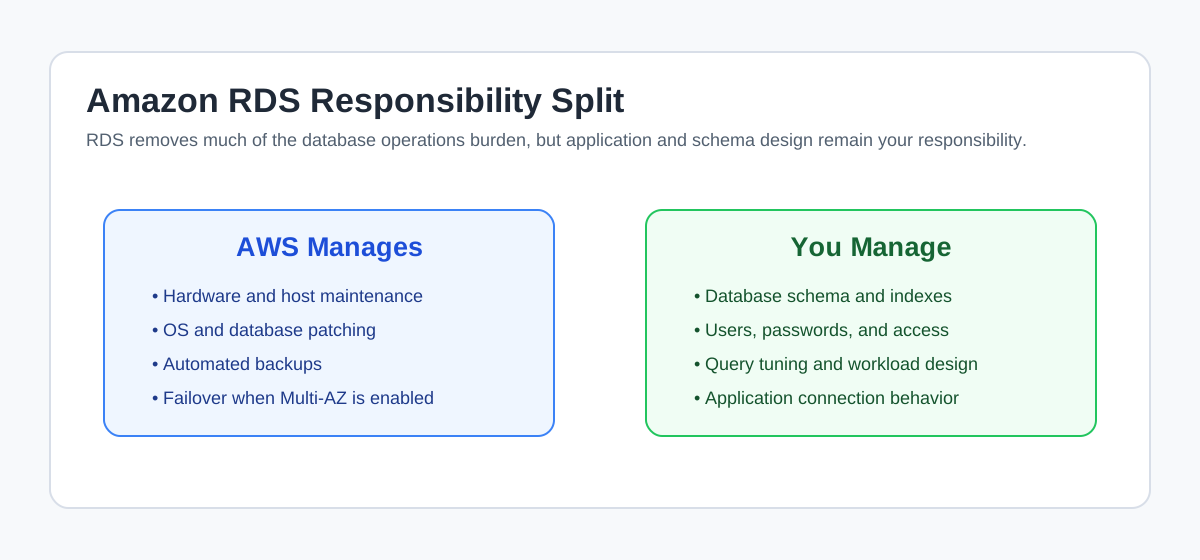 Amazon RDS manages infrastructure and operations, while users manage application-level database design
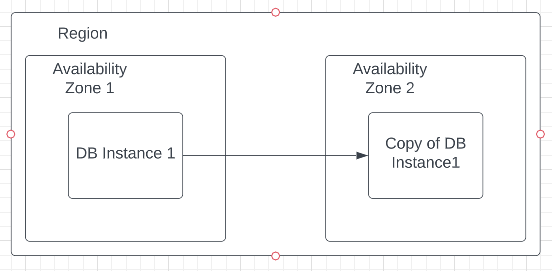 Managed RDS and Multi-AZ notes from the original Notion page
What AWS Manages
With Amazon RDS, AWS commonly manages:
- Security patching for the managed host
- Database engine software updates
- Automated backups, if enabled
- Storage volume snapshots
- Multi-AZ synchronous replication, if configured
- Automatic failover for Multi-AZ deployments
- Hardware and infrastructure maintenance
What We Still Manage
RDS is managed, but it is not magic. We are still responsible for:
- Database schema design
- Indexing strategy
- Query tuning
- User and password management
- Application connection logic
- Backup retention choices
- Maintenance windows
- Security group access
RDS removes a lot of database administration work, but it does not remove the need for good schema design, indexing, monitoring, and query tuning.
RDS Database Engine Options
Amazon RDS supports several relational database engines. The current RDS engine family includes:
| Engine | Common use case |
|---|---|
| Amazon RDS for Db2 | IBM Db2 workloads on AWS |
| Amazon RDS for MariaDB | MySQL-compatible open source workloads |
| Amazon RDS for Microsoft SQL Server | SQL Server applications and Microsoft stack workloads |
| Amazon RDS for MySQL | Web applications, SaaS, and general relational workloads |
| Amazon RDS for Oracle | Enterprise Oracle workloads |
| Amazon RDS for PostgreSQL | Reliable, extensible open source relational workloads |
Amazon Aurora is a separate AWS relational database engine compatible with MySQL and PostgreSQL. It is often discussed alongside RDS, but Aurora has its own architecture and behavior.
Licensing Options
Depending on the database engine, licensing can work in different ways:
- License included — AWS includes the database software license in the hourly price.
- Bring Your Own License (BYOL) — We bring an existing eligible license.
This matters most for commercial engines such as Oracle and Microsoft SQL Server.
RDS Limits
The Notion notes call out a practical account-level limit that is easy to forget during labs and experiments:
- An AWS account can create up to 40 RDS DB instances by default.
- When using AWS-provided licenses for Oracle or Microsoft SQL Server, only 10 of those can be Oracle or SQL Server instances.
- With a Bring Your Own License model, the commercial-engine split can be different because the licensing responsibility moves to the customer.
These limits matter when we create multiple demo databases, restore snapshots into new instances, or leave old test databases running.
RDS Instance Storage
Amazon RDS uses durable block storage for database files and logs. We do not access the underlying EC2 host directly; we access only the database endpoint and database engine.
Common storage options include:
| Storage type | Best for |
|---|---|
| General Purpose SSD | Development, testing, and moderate database workloads |
| Provisioned IOPS SSD | Production workloads that need consistent I/O performance |
| Magnetic | Backward compatibility; not recommended for new workloads |
The right storage type depends on workload size, latency requirements, I/O needs, and budget.
For production databases with high write volume or predictable latency requirements, Provisioned IOPS is often a better fit than basic general-purpose storage.
DB Instance Classes
The DB instance class determines compute and memory capacity. Similar to EC2 instance types, RDS instance classes are grouped by workload shape:
- General purpose
- Memory optimized
- Compute optimized
- Burstable performance
If workload requirements change later, we can modify the DB instance class. Some changes can cause downtime or require a maintenance window, so production changes should be planned carefully.
Templates in RDS
When creating a database from the AWS Console, RDS provides creation templates. These help preselect sensible defaults for different usage patterns.
Common templates include:
- Production — Higher availability and durability options
- Dev/Test — Lower-cost development settings
- Free Tier — Cost-conscious settings for eligible accounts and engines
Free Tier configurations generally do not include Multi-AZ deployments. For learning, Single-AZ is fine. For production, Multi-AZ should be considered when availability matters.
What Is Multi-AZ in RDS?
Multi-AZ improves availability by keeping database infrastructure in more than one Availability Zone within the same AWS Region.
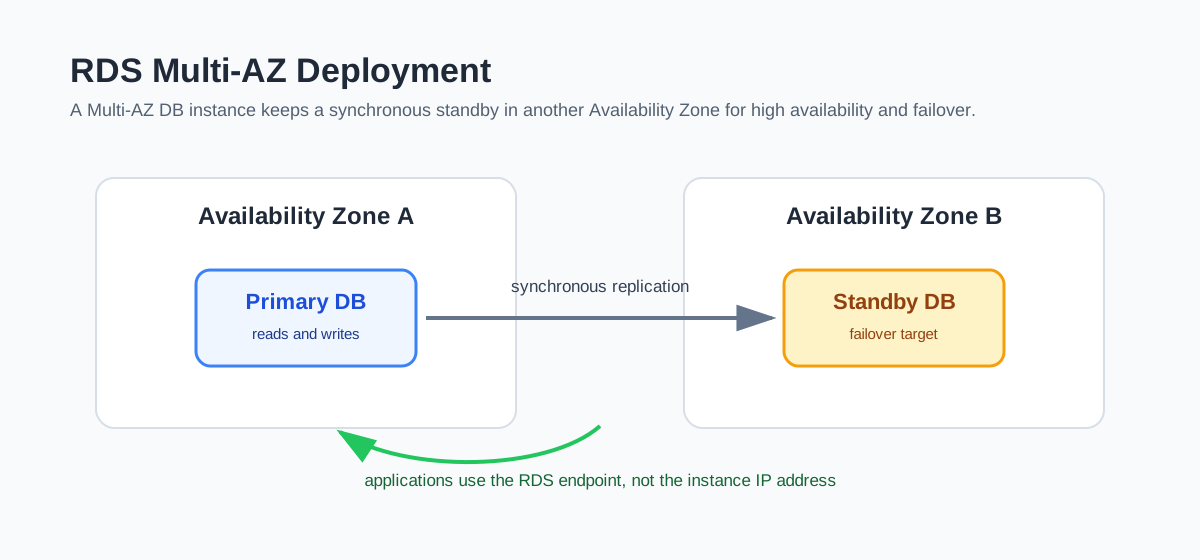 A Multi-AZ DB instance keeps a synchronous standby in another Availability Zone
For a traditional Multi-AZ DB instance deployment:
- There is a primary DB instance.
- AWS creates and maintains a standby DB instance in another Availability Zone.
- Replication between primary and standby is synchronous.
- The standby is for failover and does not serve read traffic.
- Applications should connect using the RDS endpoint, not an IP address.
For newer Multi-AZ DB cluster deployments, RDS can use one writer and two readable standby instances across three Availability Zones. That is different from the classic single-standby Multi-AZ DB instance pattern.
Why the Endpoint Matters
The RDS endpoint is the stable name applications should use to connect to the database. During failover, AWS updates where that endpoint points.
If an application uses the database instance IP address directly, failover can break the application. If it uses the RDS endpoint, the application can reconnect after failover using the same host name.
Always configure applications with the RDS endpoint. Do not hard-code the database instance IP address.
When Multi-AZ Failover Can Happen
RDS failover can be triggered by events such as:
- Primary DB instance failure
- Availability Zone failure
- Loss of network connectivity to the primary
- Storage failure on the primary
- OS patching or maintenance
- Manual reboot with failover
During failover, application connections can be interrupted. Applications should use connection retry logic.
Maintenance and Engine Upgrades
Every RDS database has a maintenance window. AWS can use this window for infrastructure maintenance or pending modifications, depending on configuration.
Typical maintenance activities include:
- Operating system patching
- DB engine minor version updates
- System upgrades
- Some scaling or configuration changes
For Multi-AZ deployments, maintenance is designed to reduce impact where possible, but some operations can still cause an outage. Engine version upgrades should be scheduled carefully, especially for production systems.
Automated Backups
RDS automated backups let us restore a DB instance to a point in time within the configured retention period.
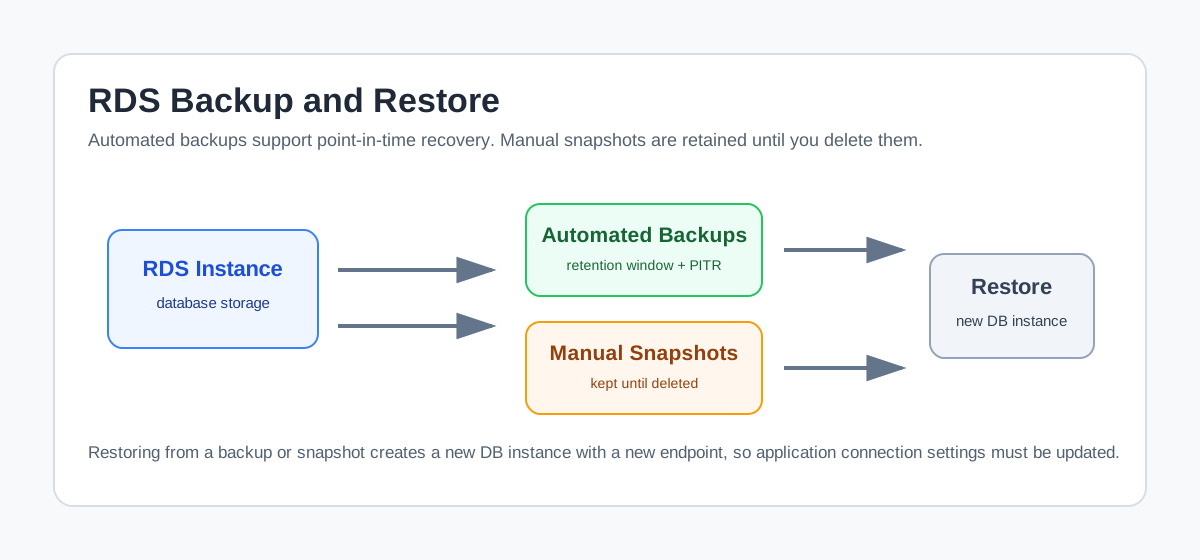 Automated backups support point-in-time recovery; manual snapshots are retained until deleted
Automated backups include:
- A storage volume snapshot of the DB instance
- Transaction logs
- A configurable backup window
- A configurable retention period
- Point-in-time recovery within that retention period
Automated backups are stored in Amazon S3 behind the scenes. We do not manage those backup objects directly like normal S3 objects.
Important notes:
- The DB instance must be in the
availablestate for automated backups. - Backups are retained according to the configured retention period.
- If automated backups are retained during deletion, they remain for the retention period.
- Final and manual snapshots are independent of automated backups.
Manual Snapshots
Manual snapshots are user-initiated backups of an RDS DB instance.
They differ from automated backups in several important ways:
| Feature | Automated backups | Manual snapshots |
|---|---|---|
| Created by | RDS schedule | User action |
| Point-in-time recovery | Yes, within retention window | No |
| Deleted with DB instance | Usually yes, unless retained | No |
| Sharing | Copy first in some cases | Can be shared directly, depending on encryption |
| Restore target | New DB instance | New DB instance |
Manual snapshots are useful before risky changes or before deleting a database that might be needed later.
When restoring from a snapshot:
- RDS creates a new DB instance.
- The restored instance has a new endpoint.
- We cannot restore directly into an existing DB instance.
- We can often change settings such as storage type during restore.
Encryption in RDS
RDS supports encryption at rest using AWS KMS.
When encryption is enabled, RDS encrypts:
- Database storage
- Logs
- Automated backups
- Snapshots
- Read replicas
RDS encryption uses AES-256 under the hood and is handled transparently by AWS after configuration. Applications do not need to change SQL queries to use encrypted storage.
Important limitations:
- Encryption is enabled when creating a DB instance.
- We cannot directly turn on encryption for an existing unencrypted DB instance.
- We cannot turn off encryption for an encrypted DB instance.
- To encrypt an existing unencrypted database, create and copy a snapshot with encryption, then restore from the encrypted snapshot.
Decide encryption requirements before creating production databases. Retrofitting encryption later usually means snapshot, copy, restore, and endpoint migration work.
RDS Billing Basics
RDS does not require upfront cost for on-demand usage. Costs usually come from:
- DB instance hours
- Storage allocated to the database
- Provisioned IOPS, if configured
- Backup storage beyond free allocation
- Data transfer
- Multi-AZ standby resources
- Additional read replicas or clusters
For Multi-AZ, remember that standby infrastructure also has cost. We use Multi-AZ for availability, not as a free backup copy.
Creating an RDS Database
At a high level, the console flow is:
- Open the AWS Console.
- Go to RDS.
- Choose Databases.
- Click Create database.
- Choose Standard create or Easy create.
- Select the database engine.
- Choose the template.
- Configure DB instance size and storage.
- Configure availability, backups, monitoring, and maintenance.
- Configure networking and security groups.
- Click Create database.
Standard Create vs. Easy Create
| Option | Meaning |
|---|---|
| Standard create | Lets us configure most database settings manually |
| Easy create | Uses AWS best-practice defaults with fewer choices |
For learning, Easy create can be convenient. For production, Standard create is usually better because we need to consciously choose networking, backup, security, and availability settings.
Connecting to RDS
To connect to an RDS database, we need:
- RDS endpoint
- Port
- Database username
- Database password
- A client that can reach the DB instance network
Security groups must allow traffic to the database port. For example:
| Engine | Common port |
|---|---|
| MySQL / MariaDB | 3306 |
| PostgreSQL | 5432 |
| SQL Server | 1433 |
| Oracle | 1521 |
Do not open SSH port 22 for RDS. RDS is managed, and we do not SSH into the database host.
For safer access, place RDS in private subnets and allow inbound database traffic from an application security group, EC2 bastion security group, or Lambda security group instead of allowing traffic from everywhere.
Connecting Lambda to RDS
A common pattern is:
- A file lands in S3.
- S3 triggers a Lambda function.
- Lambda reads the file.
- Lambda connects to RDS.
- Lambda inserts or updates database rows.
For Lambda to connect to a private RDS database:
- Lambda must be configured inside the same VPC, or a network path must exist.
- Lambda must use subnets that can reach the RDS subnets.
- The RDS security group must allow inbound traffic from the Lambda security group.
- Credentials should be stored securely, ideally in AWS Secrets Manager, not hard-coded in environment variables.
An intentionally simplified Lambda flow looks like this:
1
2
3
4
5
6
7
8
9
10
11
12
13
14
15
16
17
18
19
20
21
22
23
24
25
26
27
28
29
30
31
32
import os
import boto3
import pymysql

s3_client = boto3.client("s3")

def lambda_handler(event, context):
    bucket = event["Records"][0]["s3"]["bucket"]["name"]
    key = event["Records"][0]["s3"]["object"]["key"]

    obj = s3_client.get_object(Bucket=bucket, Key=key)
    body = obj["Body"].read().decode("utf-8")

    connection = pymysql.connect(
        host=os.environ["RDS_HOST"],
        user=os.environ["RDS_USER"],
        password=os.environ["RDS_PASSWORD"],
        database=os.environ["RDS_DATABASE"],
    )

    try:
        with connection.cursor() as cursor:
            cursor.execute(
                "CREATE TABLE IF NOT EXISTS uploads (object_key VARCHAR(255), payload TEXT)"
            )
            cursor.execute(
                "INSERT INTO uploads (object_key, payload) VALUES (%s, %s)",
                (key, body),
            )
        connection.commit()
    finally:
        connection.close()
This example shows the shape of the integration. Real production code should handle larger files, schema validation, retries, secret rotation, connection pooling, and idempotency.
Summary
Amazon RDS is the standard AWS service for running managed relational databases. It is most useful when we want a familiar relational engine without owning the full database server operations stack.
| Concept | Why it matters |
|---|---|
| DB instance | The core managed database environment |
| DB engine | The relational database software, such as PostgreSQL or MySQL |
| DB instance class | Compute and memory capacity |
| Storage type | Controls cost and I/O performance |
| Multi-AZ | Improves availability and failover readiness |
| Endpoint | Stable connection hostname for applications |
| Automated backups | Enable point-in-time recovery |
| Manual snapshots | Long-lived user-controlled backups |
| KMS encryption | Protects database storage, logs, backups, and snapshots |
| Security groups | Control network access to the database port |
RDS is a strong default for relational workloads because it gives us managed operations without forcing us to abandon familiar database engines and SQL-based application patterns.
Source Notes
Based on my Notion notes: Amazon RDS.