
Amazon S3, short for Simple Storage Service, is one of the most foundational AWS services. Along with services like EC2 and Lambda, S3 shows up in almost every real cloud architecture because applications constantly need somewhere durable, scalable, and inexpensive to store files.
S3 is not a traditional file system. It is object storage. Instead of creating directories on a disk, we store objects inside buckets and retrieve them using keys. This model is simple, but it is powerful enough for media files, logs, backups, application packages, data lakes, migration staging areas, and static websites.
Amazon S3 Fundamentals
Amazon S3 is designed for storing large objects using a key-value approach. The key is the object’s unique name inside a bucket. The value is the object’s content and metadata.
For example:
| Key | Value |
|---|---|
images/logo.png | The actual image file |
logs/2025/app.log | The log file content |
backups/orders-2025-05-12.bak | A database backup file |
This is why S3 is called object storage. We store an object and associate that object with a key.
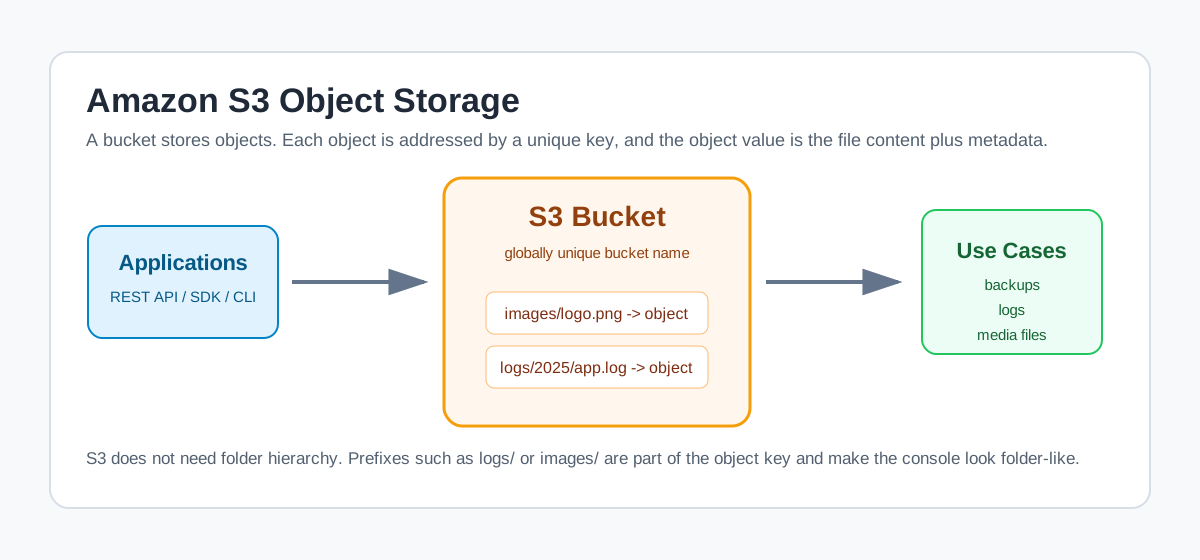 S3 stores objects in buckets, and each object is addressed by a unique key
Important characteristics of S3:
- It provides a REST API, SDKs, CLI support, and console access.
- It can store almost any file type, including text, binary files, archives, logs, media files, and backups.
- It scales storage automatically.
- It stores data redundantly across multiple Availability Zones for regional storage classes.
- S3 Standard is designed for 99.99% availability and 99.999999999% durability.
S3’s 11 nines durability means the probability of losing an object stored correctly in S3 is extremely low. Durability is about not losing data. Availability is about being able to access it when needed.
Creating an S3 Bucket
To create a bucket, open the AWS Console, search for S3, and choose Create bucket.
A bucket is the top-level container for objects in S3. If we want to store anything in S3, it must live inside a bucket.
When creating a bucket, we choose:
- Bucket name
- AWS Region
- Object ownership settings
- Block Public Access settings
- Bucket versioning
- Default encryption
- Advanced options such as Object Lock
Bucket Names
S3 bucket names must be globally unique. This does not mean unique only within one AWS account. It means unique across all AWS accounts.
Bucket names also appear in URLs, so they need to follow DNS-friendly naming rules. In practice, use:
- Lowercase letters
- Numbers
- Hyphens
- Periods, when appropriate
Avoid spaces, uppercase letters, and special characters.
Bucket Region
Amazon S3 is a global service in the AWS console, but buckets are created in a specific Region. When creating a bucket, we choose where the data should live.
Choose the Region based on:
- Proximity to users and applications
- Compliance and data residency requirements
- Cost
- Integration with other AWS services
Block Public Access
S3 buckets are private by default. The Block Public Access setting is a safety control that helps prevent accidental public exposure.
For normal private storage, keep public access blocked. Only disable it intentionally, such as when creating a public static website bucket.
Treat public access as an exception. Most buckets should stay private and be accessed through IAM, bucket policies, pre-signed URLs, or application-controlled access.
Object Lock
Object Lock uses a write-once-read-many model, often called WORM. It helps prevent objects from being deleted or overwritten for a fixed amount of time or indefinitely.
This is useful for regulated environments where records must be retained and protected from modification.
Important point:
- Object Lock must be enabled when the bucket is created.
- Bucket versioning is required for Object Lock.
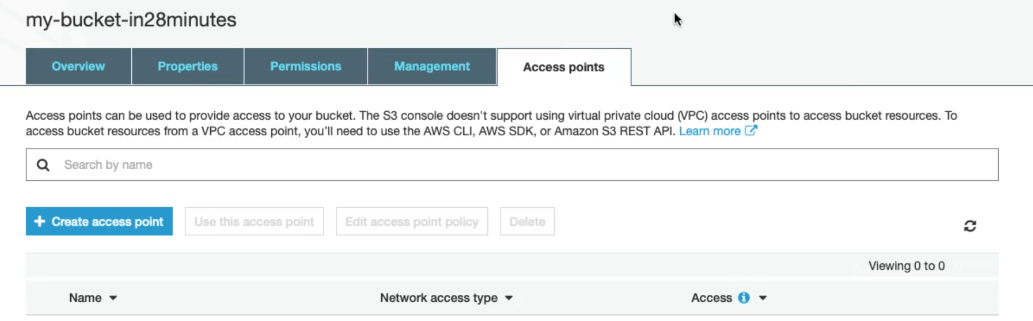 The created S3 bucket from the original Notion notes
Uploading Files to S3
After creating a bucket, open it and choose Upload. We can upload individual files or folders through the console, or use the AWS CLI and SDKs for automation.
During upload, we can choose settings such as:
- Storage class
- Encryption
- Metadata
- Tags
- Permissions
For frequently accessed data, S3 Standard is the common default choice. For less frequently accessed or archival data, other storage classes can reduce cost.
Understanding Objects, Buckets, and Keys
The core model of S3 is simple:
| Concept | Meaning |
|---|---|
| Bucket | Container for S3 objects |
| Object | File content plus metadata |
| Key | Unique object name inside a bucket |
| Value | The actual object data |
| Metadata | System or user-defined information about the object |
Every object key must be unique within a bucket. If we upload another object with the same key and versioning is disabled, the new object replaces the old one.
S3 does not have real folders in the same way a file system does. The console shows folder-like structures by using prefixes in object keys.
For example, this key:
1
logs/production/api.log
looks like a file inside folders, but to S3 it is simply one object key.
The maximum size of a single S3 object is 5 TB. Large objects should be uploaded using multipart upload.
S3 Storage Classes
Different objects have different access patterns. Some files are read frequently. Some are kept only for backup. Some are rarely accessed but must be retained for years.
S3 storage classes help match cost and performance to those patterns.
| Storage class | Best for |
|---|---|
| S3 Standard | Frequently accessed data |
| S3 Intelligent-Tiering | Unknown or changing access patterns |
| S3 Standard-IA | Infrequently accessed data that still needs fast retrieval |
| S3 One Zone-IA | Re-creatable infrequently accessed data stored in one AZ |
| S3 Glacier Instant Retrieval | Archive data that still needs immediate access |
| S3 Glacier Flexible Retrieval | Long-term archive data with retrieval delay |
| S3 Glacier Deep Archive | Lowest-cost long-term archival storage |
Storage class is configured at the object level, so a bucket can contain objects in multiple storage classes.
Use lifecycle policies to move older objects into cheaper storage classes automatically instead of doing this manually.
Playing with S3 Versioning
Versioning keeps multiple versions of the same object in a bucket. This helps protect against accidental overwrites and accidental deletion.
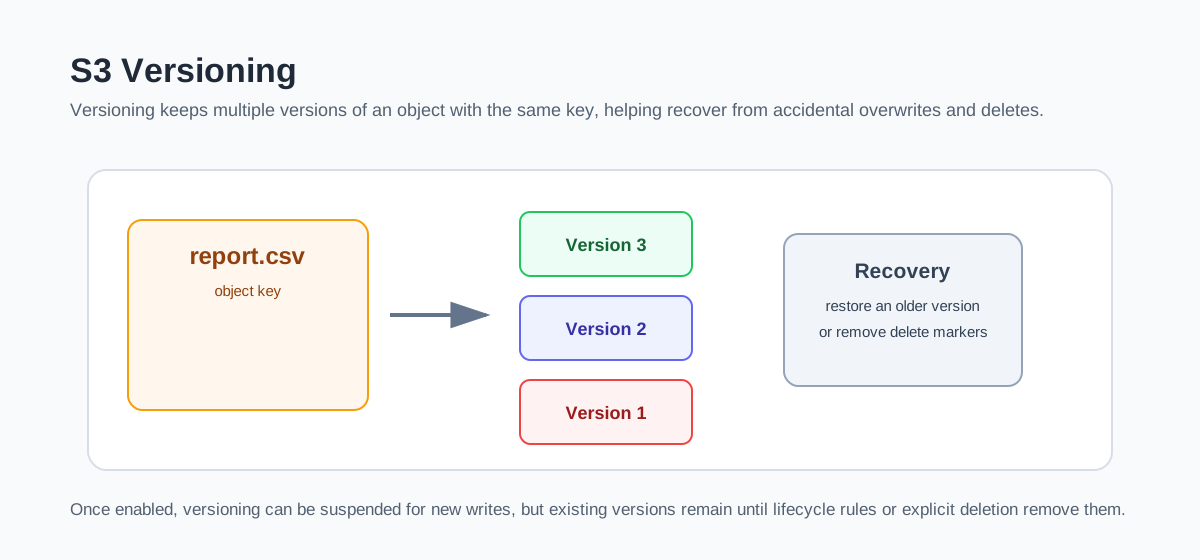 Versioning keeps old versions of an object under the same object key
For example, if we upload report.csv, then upload a new report.csv later, S3 can retain both versions when versioning is enabled.
Important versioning behavior:
- Versioning is optional.
- We can enable versioning on an existing bucket.
- Old objects in a previously unversioned bucket have a
nullversion ID. - Once enabled, versioning cannot be fully turned off.
- It can be suspended, but existing versions remain.
Suspending versioning affects future writes. It does not remove versions that already exist.
Server Access Logging
S3 server access logging records requests made to a bucket. This can help answer questions such as:
- Who accessed an object?
- Which objects are being requested?
- What request types are being made?
- When did requests happen?
When enabling server access logging, we choose a destination bucket and optionally a prefix such as:
1
logs/
For learning, we can send logs to a test bucket. For production, use a dedicated logging bucket and apply lifecycle rules to avoid uncontrolled log growth.
Be careful with logging in free-tier experiments. Logs are objects too, and they can create additional storage and request costs.
Creating a Public Static Website with S3
S3 can host static websites made of HTML, CSS, JavaScript, images, and other static assets.
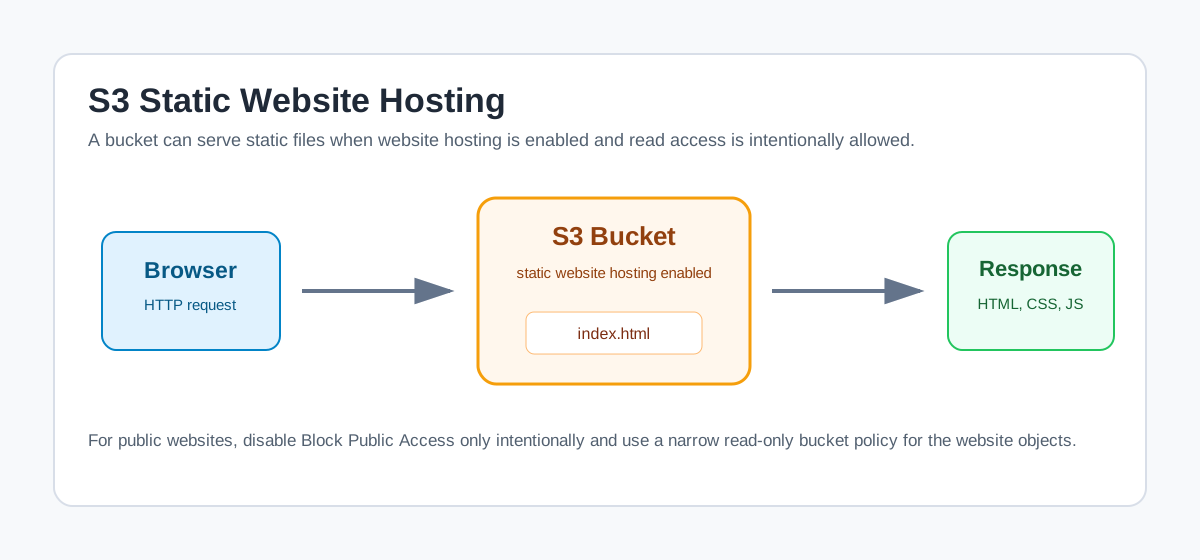 S3 can serve static website files when hosting and read permissions are configured
The basic steps are:
- Create a bucket.
- Upload website files, including
index.html. - Enable static website hosting in bucket properties.
- Set the index document to
index.html. - Disable Block Public Access only if this bucket is intended to be public.
- Add a read-only bucket policy for public website objects.
A simple public read policy looks like this:
1
2
3
4
5
6
7
8
9
10
11
12
{
  "Version": "2012-10-17",
  "Statement": [
    {
      "Sid": "PublicRead",
      "Effect": "Allow",
      "Principal": "*",
      "Action": "s3:GetObject",
      "Resource": "arn:aws:s3:::example-bucket-name/*"
    }
  ]
}
Replace example-bucket-name with the actual bucket name.
Bucket policies are resource-based policies because they are attached to the bucket resource. They are commonly used for:
- Public read access for static websites
- Cross-account access
- Service-to-service permissions
- Restricting access by network, principal, or condition
Do not make a bucket public unless the data is intentionally public. S3 permissions are powerful, and a small mistake can expose sensitive files.
Object-Level Logging with CloudTrail
Server access logging is useful, but AWS CloudTrail can also track object-level API activity for S3.
With CloudTrail data events, we can track operations such as:
- Object reads
- Object writes
- Deletes
- API-level access patterns
This is especially useful when we need audit trails for sensitive buckets.
Default Encryption
Encryption is one of the most important controls for cloud storage. S3 now encrypts new object uploads by default using SSE-S3, which is server-side encryption with Amazon S3 managed keys.
We can also configure other encryption options:
| Encryption option | Meaning |
|---|---|
| SSE-S3 | S3 manages the encryption keys |
| SSE-KMS | AWS KMS manages the keys and gives more control |
| DSSE-KMS | Dual-layer server-side encryption with AWS KMS keys |
Use SSE-S3 for simple default encryption. Use SSE-KMS when we need more control over key policies, audit behavior, key rotation, or cross-account access.
Object Locks, Tags, and Transfer Acceleration
S3 has several advanced features that become useful as workloads grow.
Object Lock
Object Lock helps prevent deletion or overwrite of objects. It is useful when data must be retained for compliance reasons.
It supports retention modes and legal holds, depending on the business requirement.
Tags
Tags are key-value pairs assigned to AWS resources and S3 objects.
S3 object tags can be used for:
- Automation
- Security policies
- Cost tracking
- Lifecycle policies
- Data classification
For example:
| Tag key | Tag value |
|---|---|
Environment | prod |
DataClass | logs |
Retention | 90-days |
Tags can be updated during the life of an object.
Transfer Acceleration
S3 Transfer Acceleration helps speed up file transfers to and from a bucket by using AWS edge locations. It is useful when users upload from geographically distant locations.
Events
S3 event notifications can trigger other AWS services when changes happen in a bucket.
Common examples:
- Trigger Lambda when a file is uploaded.
- Send events to SQS for downstream processing.
- Notify SNS subscribers about object changes.
Requester Pays
Requester Pays shifts data transfer and request costs to the requester instead of the bucket owner. This is useful for shared datasets where consumers should pay for their own access.
Summary
S3 is one of the most useful AWS services because it solves a simple problem extremely well: storing and retrieving objects durably at cloud scale.
| Concept | Why it matters |
|---|---|
| Bucket | Top-level container for S3 objects |
| Object | File content plus metadata |
| Key | Unique identifier for an object inside a bucket |
| Storage class | Controls cost, availability, and access behavior |
| Versioning | Protects against overwrites and accidental deletion |
| Bucket policy | Resource-based access control |
| Default encryption | Protects objects at rest |
| Lifecycle policies | Automatically move or expire objects |
| Static website hosting | Serves public static content from S3 |
Once buckets, objects, keys, versioning, permissions, and storage classes make sense, S3 becomes much easier to reason about. It is not a file server. It is a durable object store, and many AWS architectures are built around that idea.
Source Notes
Based on my Notion notes: Exploring S3 Fundamentals - Object Storage in AWS.