
Cloud computing has fundamentally changed how modern applications are built, deployed, and scaled. Before jumping into building on AWS, it is crucial to understand the foundational concepts — what the cloud is, why we need it, and how AWS structures its global infrastructure through Regions, Availability Zones, and IAM. This post walks through these fundamentals in detail.
Introduction to Cloud and AWS
What is Cloud Computing?
In traditional IT architecture, enterprises would purchase physical infrastructure sized for their peak load. Imagine an e-commerce application that sees massive traffic spikes during holiday seasons — say, 10,000 concurrent users — but handles only a fraction of that on normal days. To serve those peak moments, companies had to buy and maintain hardware capable of supporting that maximum load, even though most of the time that hardware would simply sit idle.
Challenges with Traditional Architecture
- Low Infrastructure Utilization — Servers idle most of the time while being provisioned for peak load.
- Ahead-of-time Planning — Predicting future peak load accurately is nearly impossible.
- High Upfront Costs — Physical servers are expensive to procure.
- Dedicated Maintenance Teams — In-house hardware requires ongoing operational overhead.
Why Use Cloud?
The cloud solves these problems with a simple principle: On-Demand Resource Provisioning. Instead of buying infrastructure, you rent it. You provision resources when you need them and release them back to the cloud when you don’t.
Key advantages of the cloud:
- Pay-as-you-go — You only pay for what you use, for as long as you use it.
- No upfront planning — React to demand as it comes in.
- Managed services — AWS handles undifferentiated heavy lifting. Need a highly available, durable database? A few clicks in the console and you have one — no need to set up standbys, backup processes, or failover yourself.
Note: The most important challenge with the cloud is building a cloud-enabled application — one that takes full advantage of cloud primitives like elasticity, managed services, and global distribution.
Creating an IAM User for Your AWS Account
The root user of an AWS account has unrestricted access to everything. Because of this, AWS strongly recommends never using the root account for day-to-day activities. Instead, you should create an IAM user and work through that.
What is IAM?
IAM stands for Identity and Access Management. It is the AWS framework for managing digital identities and controlling access to AWS resources. IAM handles two core concepts:
- Authentication — Verifying who you are (e.g., username + password, MFA).
- Authorization — Controlling what you are allowed to do once authenticated (e.g., read S3 but not write).
Features of IAM
| Feature | Description |
|---|---|
| Shared Access | Create separate usernames and passwords for individual users or applications |
| Granular Permissions | Allow downloads but deny updates — fine-grained policy control |
| MFA Support | Multi-Factor Authentication with one-time codes from a phone or hardware key |
| Identity Federation | Trust external identity providers (Google, Facebook, corporate SSO) |
| Free to Use | No additional charge for IAM users, groups, or policies |
| PCI DSS Compliant | Meets Payment Card Industry security standards |
| Password Policy | Enforce complexity rules, rotation schedules, and lockout policies |
Components of IAM
Users
An IAM user is an identity with credentials and permissions. It can represent a human employee or an application. Each user belongs to exactly one AWS account, and by default, a newly created user has no permissions — access is explicitly granted.
Groups
An IAM group is a collection of IAM users. Instead of managing permissions user-by-user, you assign permissions at the group level and every user in that group inherits them. Adding a new user to the group automatically grants them all the group’s policies — dramatically reducing administrative burden.
Policies
IAM policies are JSON documents that define permissions — who can access what resources and what actions they can perform. There are three types:
- AWS Managed Policies — Pre-built, maintained by AWS (e.g.,
AdministratorAccess,ReadOnlyAccess) - Customer Managed Policies — Custom policies you create and attach to multiple entities
- Inline Policies — Policies embedded directly into a single user, group, or role
Here is an example policy that grants read and write access to a specific S3 path:
1
2
3
4
5
6
7
8
9
10
11
12
13
14
15
{
  "Version": "2012-10-17",
  "Statement": [
    {
      "Effect": "Allow",
      "Action": [
        "s3:GetObject",
        "s3:PutObject"
      ],
      "Resource": [
        "arn:aws:s3:::glue-demo-bucket-sudip/Read/moviesdata.csv*"
      ]
    }
  ]
}
Roles
An IAM role is a set of temporary permissions that any trusted entity (user, application, or AWS service like EC2 or Lambda) can assume. Unlike users, roles do not have permanent credentials. This makes them more secure — credentials are rotated automatically.
Best Practice: Whenever possible, use IAM Roles instead of long-lived access keys.
IAM Best Practices
- Users — Create individual users; never share credentials.
- Groups — Manage permissions through groups, not individual users.
- Permissions — Grant least privilege — start with minimal access, add more as needed.
- Password Policy — Enforce strong passwords with rotation requirements.
- Auditing — Enable AWS CloudTrail to audit all IAM operations.
- MFA — Enable MFA for all privileged users and the root account.
- Roles — Use IAM Roles for EC2 instances instead of embedding access keys.
- Rotate Credentials — Rotate security credentials regularly.
- Root — Reduce or eliminate root account usage.
The Need for Regions and Availability Zones
To understand why AWS Regions and Availability Zones (AZs) exist, let’s trace the evolution of a hypothetical enterprise application.
Step 1: A Single Data Center
Imagine an application deployed in a single corporate data center in London.
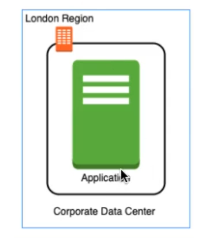 A single data center in London serving users worldwide
Problems with this architecture:
- High Latency — Users in Sydney, Mumbai, or New York experience slow access because all traffic has to travel to London.
- Low Availability — If the data center crashes, the application goes down entirely.
Step 2: Adding a Second Data Center
To improve availability, we add a second data center — still in London.
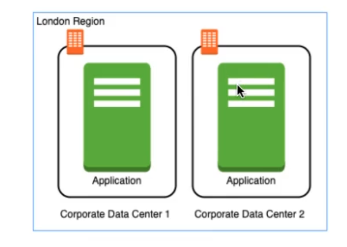 Two data centers in London for redundancy
Improvement: If one data center crashes, the other can still serve traffic. ✅
Remaining problems:
- High latency for users outside London still persists ❌
- If the entire London region is affected (e.g., a national calamity), both data centers go down ❌
Step 3: Multiple Regions
The solution is to deploy across multiple geographic regions.
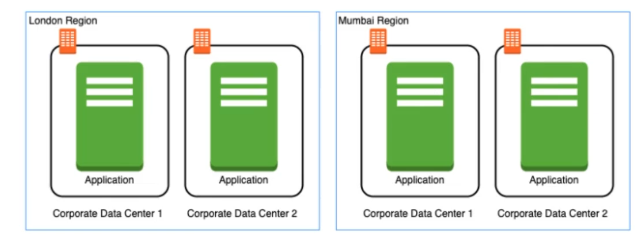 Data centers spanning London and Mumbai for global availability and low latency
By adding a Mumbai region with its own pair of data centers:
- Latency drops significantly for Indian users, who are now served from a nearby region.
- Availability improves dramatically — even if all of London goes down, Mumbai continues serving the application.
This is the exact model AWS implements at global scale.
Introduction to AWS Regions
An AWS Region is a distinct physical geographical location around the globe. Each region operates independently and has:
- Full redundancy — Each region has multiple data centers and independent network connectivity.
- Data isolation — Data in one region does not automatically replicate to another; this is controlled by you.
- AWS backbone connectivity — Inter-region communication uses AWS’s private global network, not the public internet.
- Region-specific pricing — Prices vary between regions due to local operational costs and government regulations.
AWS currently operates 20+ regions across six continents (every continent except Antarctica). You can deploy your applications to any of them with a few clicks.
Services: Regional vs. Global
| Type | Examples | Behaviour |
|---|---|---|
| Regional Services | EC2, Lambda, S3, RDS, Glue | Created and operate within a specific region; you must select a region |
| Global Services | IAM, CloudFront, Route 53 | Operate globally across all regions; no region selection required |
Advantages of Multiple Regions
- High Availability — If one region goes down, your application keeps running from another.
- Low Latency — Serve users from the region nearest to them for faster response times.
- Regulatory Compliance — Some governments require that citizen data be stored within national borders. Multiple regions let you comply easily (e.g., EU GDPR).
How to Choose the Right Region
When selecting an AWS region for your workload, consider these four factors:
- Data Governance & Legal Requirements — Local laws may restrict where data can be stored or processed (e.g., EU data protection directives, US government compliance).
- Proximity to Customers (Latency) — Choose the region closest to the majority of your users to minimize round-trip time.
- Service Availability — Not all AWS services are available in all regions. Verify your required services are present in your target region.
- Cost — Service pricing varies by region. Review the AWS pricing page for region-specific costs.
Availability Zones (AZs)
An Availability Zone (AZ) is an isolated physical location within an AWS Region. Every AWS Region contains a minimum of two AZs, and many have three, four, five, or even six.
Each AZ:
- Contains one or more physical data centers (sometimes hundreds of thousands of servers)
- Is connected to other AZs in the same region via low-latency, high-bandwidth, redundant private fiber
- Is physically separated — different power grids, cooling systems, and flood plains — so a failure in one AZ does not cascade to others
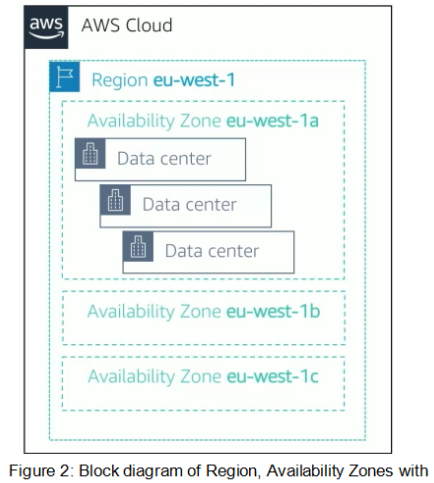 Multiple Availability Zones within a single AWS Region
Why Do We Need Availability Zones?
Even within a single country where regulations might restrict you to one region, AZs ensure high availability within that region. By deploying your application across two or more AZs in the same region, you can:
- Survive a single AZ failure without downtime
- Keep all data within the same country/region for compliance
- Achieve redundancy with low-latency replication between AZs
AZ Naming Convention
AZs are named by appending a letter to the region code:
1
2
3
us-east-1a
us-east-1b
us-east-1c
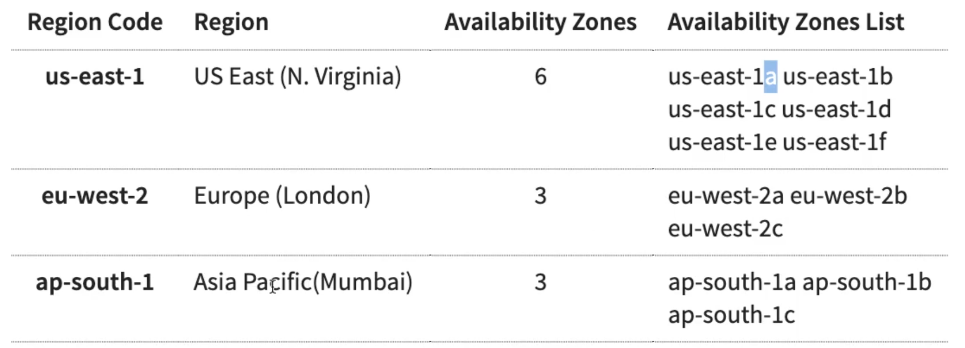 Examples of AWS Regions with their Availability Zone names
Summary
| Concept | What it is | Why it matters |
|---|---|---|
| Cloud | On-demand, rented infrastructure | No upfront costs, scale with demand |
| IAM | Identity & Access Management | Secure, granular access control |
| AWS Region | Geographic cluster of data centers | Latency, compliance, redundancy |
| Availability Zone | Isolated location within a region | High availability within a region |
Understanding these foundational concepts is the first step to building reliable, scalable, and secure applications on AWS. In the next posts, we will dive into core AWS services like EC2, S3, VPC, and Lambda — building on this infrastructure foundation.
If you found this helpful, check out the rest of the AWS series for deeper dives into compute, storage, networking, and data services on AWS.
Source Notes
Based on my Notion notes: Getting Started with Cloud and AWS Regions and AZ.