
AWS Lambda is a serverless compute service that lets us run code without provisioning or managing servers. We write a function, configure how it should be invoked, give it permissions through IAM, and AWS runs the code on our behalf.
Lambda is especially useful for event-driven work: reacting to files uploaded to S3, API requests from API Gateway, messages in SQS, records in DynamoDB Streams, or scheduled jobs from EventBridge.
What Is AWS Lambda?
AWS Lambda runs code on highly available AWS-managed compute infrastructure. We do not manage the underlying servers, operating system, runtime patching, or fleet scaling.
With Lambda, AWS manages:
- Compute capacity and provisioning
- Server and operating system maintenance
- Runtime execution environment
- High availability
- Automatic scaling
- Fleet health monitoring
- Security patching
- Logging integration with CloudWatch
We provide:
- Function code
- Runtime choice
- Memory and timeout configuration
- IAM execution role
- Environment variables
- Event source or trigger configuration
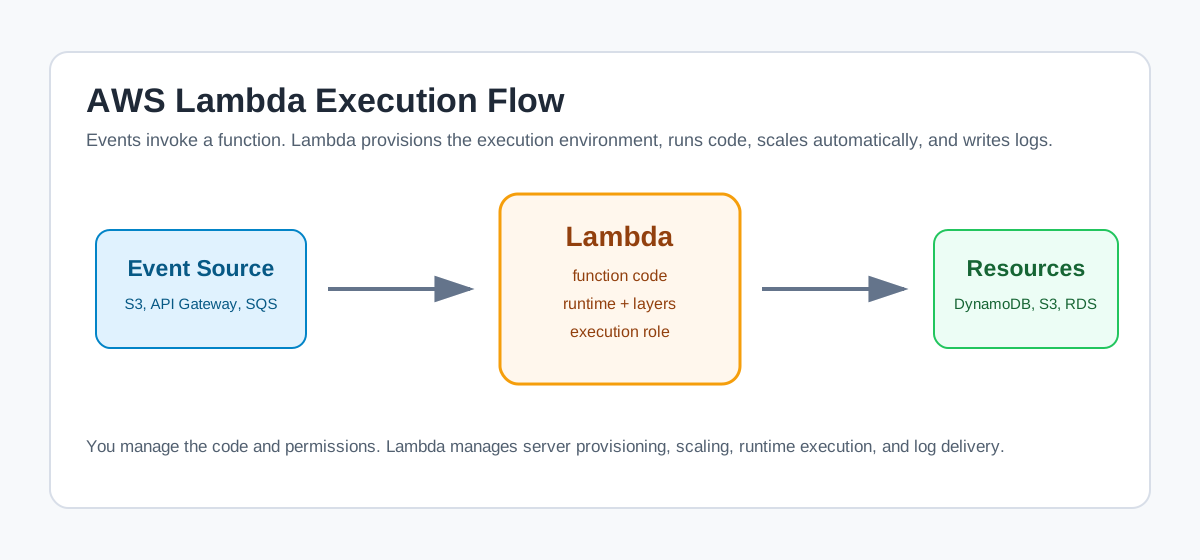 Events invoke Lambda functions, and those functions call downstream services
Lambda executes code only when needed and scales based on incoming events. We are charged based on requests and execution duration, not for idle server time.
Lambda is a tradeoff: we gain serverless scaling and lower operations burden, but we give up direct server access and deep operating-system customization.
How Lambda Works
The basic flow is:
- We write function code.
- We deploy it to Lambda as a function.
- An event source invokes the function.
- Lambda creates or reuses an execution environment.
- The runtime passes the event to our handler.
- Our code processes the event and returns a response or result.
- Logs and metrics are sent to CloudWatch.
The function is the basic building block. A Lambda application can contain one function or many functions connected by events.
Lambda vs EC2
Lambda and EC2 are both compute services, but they solve different problems.
| AWS Lambda | Amazon EC2 |
|---|---|
| Serverless compute | Virtual server infrastructure |
| We deploy function code | We manage an operating system and server runtime |
| AWS manages capacity, patching, and scaling | We manage instance size, OS patches, and server lifecycle |
| Best for event-driven and short-lived tasks | Best for long-running services, custom OS needs, or persistent compute |
| Runs for up to 15 minutes per invocation | Runs as long as the instance is running |
| Pay for requests and duration rounded to 1 ms | Pay for instance runtime and attached resources |
If we need full control over the operating system, custom daemons, long-running processes, or specialized networking, EC2 is often better. If we need event-driven code that scales automatically, Lambda is a strong fit.
Important Lambda Terms
| Term | Meaning |
|---|---|
| Function | Lambda resource that contains code and configuration |
| Runtime | Language-specific environment that runs the handler |
| Handler | Function entry point that receives the event |
| Event | JSON document passed into the function |
| Trigger / event source | Service or configuration that invokes the function |
| Execution role | IAM role Lambda assumes while running the function |
| Downstream resource | Service the function calls, such as S3, DynamoDB, or RDS |
| Concurrency | Number of function invocations running at the same time |
| Layer | Shared code or dependencies attached to a function |
Runtime and Configuration
Lambda supports multiple runtimes, including current Node.js, Python, Java, .NET, Ruby, and OS-only runtimes for custom languages.
Important configuration values include:
- Memory: 128 MB to 10,240 MB, in 1 MB increments
- Timeout: Up to 900 seconds, or 15 minutes
- Environment variables: Configuration values available to code
- Ephemeral storage:
/tmpstorage configurable from 512 MB to 10,240 MB - Layers: Up to 5 layers per function
- Execution role: IAM permissions used by the function
CPU power increases proportionally with memory. Increasing memory can sometimes reduce runtime enough to improve both performance and cost.
Do not treat memory as only memory. In Lambda, memory also influences CPU allocation.
Lambda Triggers
Lambda can run in response to many AWS events:
- S3 object uploads
- DynamoDB stream records
- SQS messages
- SNS notifications
- API Gateway requests
- EventBridge schedules
- CloudWatch Logs events
- Kinesis stream records
For example, when a user uploads an object to S3, S3 can publish an ObjectCreated event. That event can invoke a Lambda function, which can read the object, validate it, transform it, write metadata to DynamoDB, and log the result.
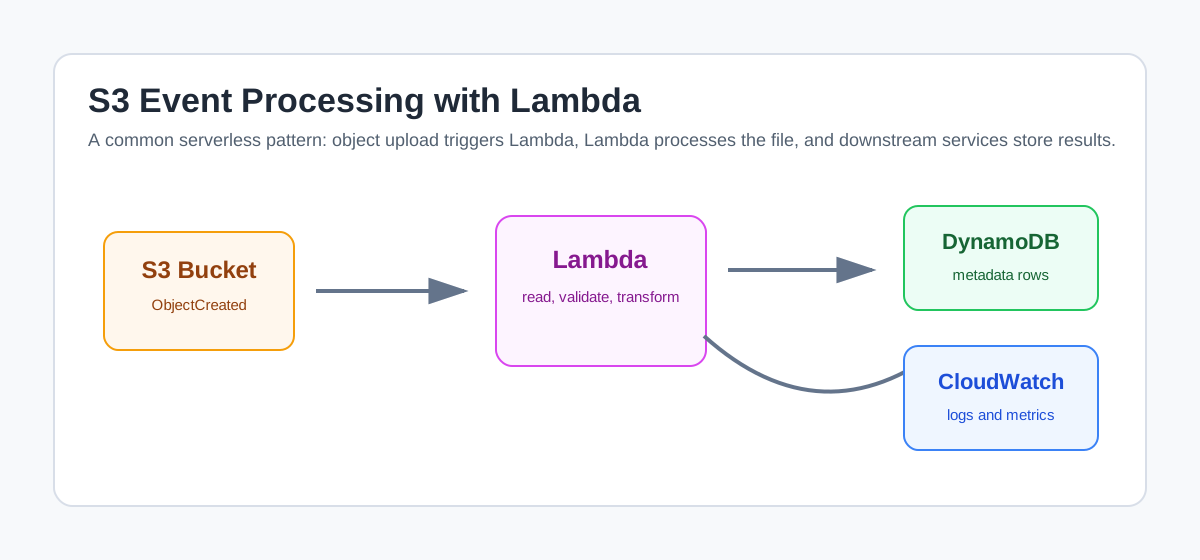 S3 object events can invoke Lambda, which can process the file and write results downstream
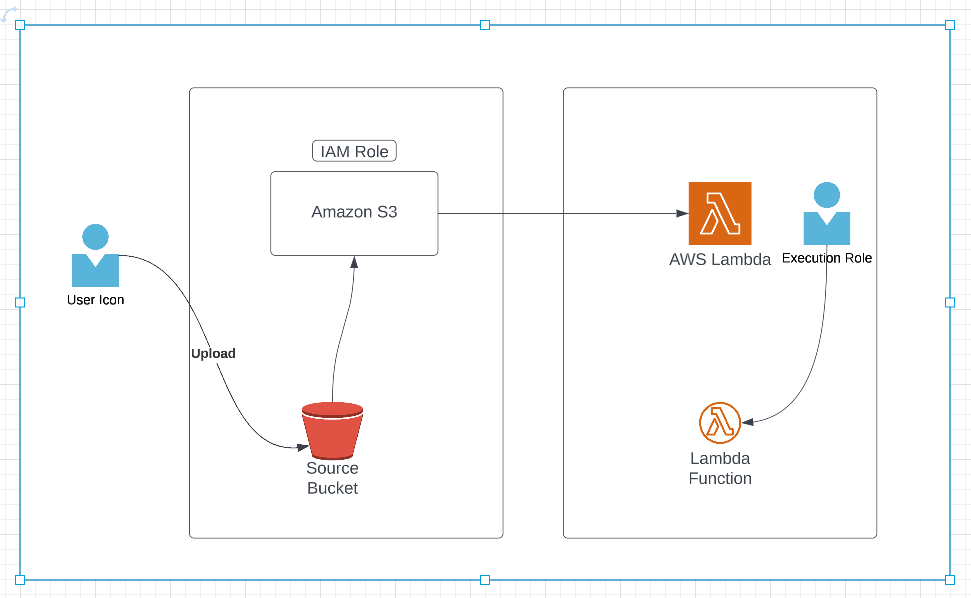 S3 object creation invoking Lambda from the original Notion page
Lambda Invocation Types
There are three major invocation models.
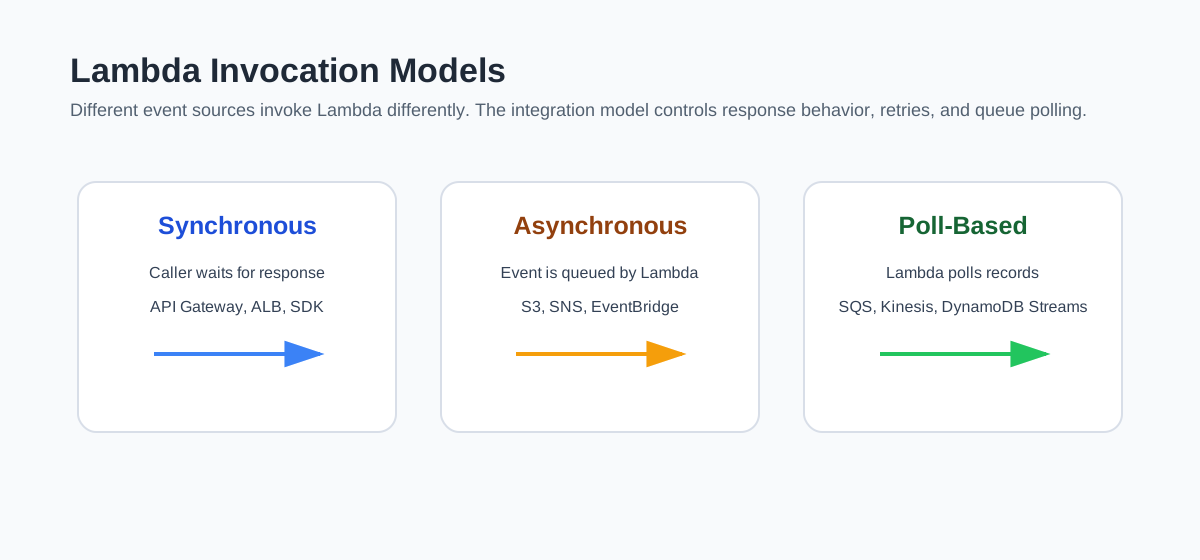 Lambda supports synchronous, asynchronous, and poll-based invocation models
Synchronous Invocation
The caller invokes Lambda and waits for the response.
Common examples:
- API Gateway
- Application Load Balancer
- Amazon Cognito
- CloudFront
- Direct SDK invoke
This model is used when the caller needs the result immediately.
Asynchronous Invocation
The event is accepted and queued for processing. Lambda returns quickly, and the function runs in the background.
Common examples:
- S3 events
- SNS
- EventBridge
- CloudWatch Logs
- AWS Config
Asynchronous invocation is useful when the event producer does not need a direct function response.
Poll-Based Invocation
Lambda polls a stream or queue, retrieves records, and invokes the function.
Common examples:
- Amazon SQS
- Amazon Kinesis
- DynamoDB Streams
This model is helpful because Lambda manages the polling infrastructure for us.
Services Lambda Can Access
Lambda can call:
- AWS services such as S3, DynamoDB, RDS, Redshift, and ElastiCache
- Public APIs on the internet
- Private resources inside a VPC
- Services running on EC2
For private VPC access, we must configure:
- VPC
- Subnets
- Security groups
- IAM permissions
- Network access to the target resource
For example, if a Lambda function needs to connect to a private RDS database, the Lambda function must have network access to the RDS subnets, and the RDS security group must allow inbound traffic from the Lambda security group.
Creating a Lambda Function
The basic console flow is:
- Open AWS Lambda.
- Choose Create function.
- Select Author from scratch.
- Provide a function name.
- Choose a runtime.
- Choose or create an execution role.
- Create the function.
- Add triggers.
- Deploy code.
- Test and inspect CloudWatch logs.
The execution role is critical. If the function needs to read S3 and write DynamoDB, the role must have permissions for those actions.
Start with least privilege. Give the Lambda execution role only the permissions it needs.
Handler Names
The handler tells Lambda where to start execution.
For Python, a handler value such as:
1
lambda_function.lambda_handler
means:
- File name:
lambda_function.py - Function name:
lambda_handler
If we rename the Python file or function, we must update the handler configuration.
Demo Pattern: S3 Upload to DynamoDB
A common Lambda demo is:
- Upload a CSV file to an S3 bucket.
- S3 triggers Lambda.
- Lambda reads the object metadata.
- Lambda validates file type or prefix.
- Lambda writes metadata or rows to DynamoDB.
- CloudWatch captures logs.
A simplified Python version looks like this:
1
2
3
4
5
6
7
8
9
10
11
12
13
14
15
16
17
18
19
20
21
22
23
24
25
26
import json
import os
import boto3

dynamodb = boto3.resource("dynamodb")
table = dynamodb.Table(os.environ["TABLE_NAME"])

def lambda_handler(event, context):
    record = event["Records"][0]
    bucket = record["s3"]["bucket"]["name"]
    key = record["s3"]["object"]["key"]

    if not key.startswith("data/") or not key.endswith(".csv"):
        print(f"Skipping object: {key}")
        return {"statusCode": 200, "body": "Skipped"}

    table.put_item(
        Item={
            "object_key": key,
            "bucket": bucket,
            "event_name": record["eventName"],
        }
    )

    print(f"Wrote metadata for s3://{bucket}/{key}")
    return {"statusCode": 200, "body": json.dumps({"bucket": bucket, "key": key})}
In production, we would add idempotency, retries, schema validation, better error handling, and alarms.
Demo Pattern: Read from One S3 Bucket and Write to Another
Another useful pattern is:
- A CSV file is uploaded into a source bucket prefix such as
data/. - Lambda is triggered by the S3 event.
- Lambda reads the CSV.
- Lambda transforms the data.
- Lambda writes the output to a destination bucket.
If we use packages such as pandas, we need to package dependencies with the function, use a Lambda layer, or deploy as a container image.
Example:
1
2
3
4
5
6
7
8
9
10
11
12
13
14
15
16
17
18
19
20
21
22
23
24
25
26
27
28
29
import os
import boto3
import pandas as pd

s3_client = boto3.client("s3")

OUTPUT_BUCKET = os.environ["OUTPUT_BUCKET"]
OUTPUT_KEY = os.environ["OUTPUT_KEY"]

def lambda_handler(event, context):
    record = event["Records"][0]
    source_bucket = record["s3"]["bucket"]["name"]
    source_key = record["s3"]["object"]["key"]

    if not source_key.startswith("data/") or not source_key.endswith(".csv"):
        print(f"Skipping object: {source_key}")
        return

    response = s3_client.get_object(Bucket=source_bucket, Key=source_key)
    df = pd.read_csv(response["Body"])
    first_ten_rows = df.head(10)

    s3_client.put_object(
        Bucket=OUTPUT_BUCKET,
        Key=OUTPUT_KEY,
        Body=first_ten_rows.to_csv(index=False),
    )

    print(f"Wrote transformed output to s3://{OUTPUT_BUCKET}/{OUTPUT_KEY}")
For large files, avoid loading everything into memory. Consider streaming, chunking, AWS Glue, EMR, or another data processing service depending on the workload.
Lambda Layers
Lambda layers let us share code and dependencies across functions.
Layers are useful for:
- Common utility modules
- Shared SDK wrappers
- Native libraries
- Python packages such as pandas
- Organization-wide helper code
A function can use up to 5 layers. If dependency size or compatibility becomes difficult, container image deployment can be cleaner.
Monitoring Lambda
Lambda integrates with CloudWatch for:
- Logs
- Metrics
- Errors
- Duration
- Throttles
- Concurrent executions
After testing a function, CloudWatch Logs is usually the first place to inspect. Log statements from the function appear in the log group for that Lambda function.
Useful operational signals:
- Error count
- Duration and timeout trends
- Throttles
- Iterator age for stream sources
- Dead-letter queue or destination failures
Summary
AWS Lambda is a strong fit for serverless, event-driven workloads. It lets us focus on code and event handling while AWS manages the compute fleet, scaling, patching, and runtime infrastructure.
| Concept | Why it matters |
|---|---|
| Function | Deployable unit of Lambda code |
| Runtime | Language environment used to run the handler |
| Event | JSON input passed to the function |
| Trigger | Service or source that invokes the function |
| Execution role | IAM permissions used by the function |
| Concurrency | Number of simultaneous invocations |
| Layer | Shared dependencies or code |
| CloudWatch Logs | Main place to inspect function output |
| Timeout | Maximum invocation duration, up to 15 minutes |
Lambda is not a replacement for every compute workload, but for event-driven glue code, lightweight APIs, automation, and file-processing workflows, it is one of the most useful services in AWS.
Source Notes
Based on my Notion notes: AWS Lambda.