
The best way to understand AWS is to build small practical labs. Reading about S3, EC2, Lambda, RDS, Glue, and API Gateway is useful, but the ideas become much clearer when we create resources, wire them together, test the flow, and then clean everything up.
This post consolidates several practical AWS labs into one walkthrough. Each lab focuses on a specific hands-on pattern: static hosting, running a Flask app on EC2, building a Glue ETL pipeline, loading S3 data into RDS with Lambda, and exposing backend logic through API Gateway.
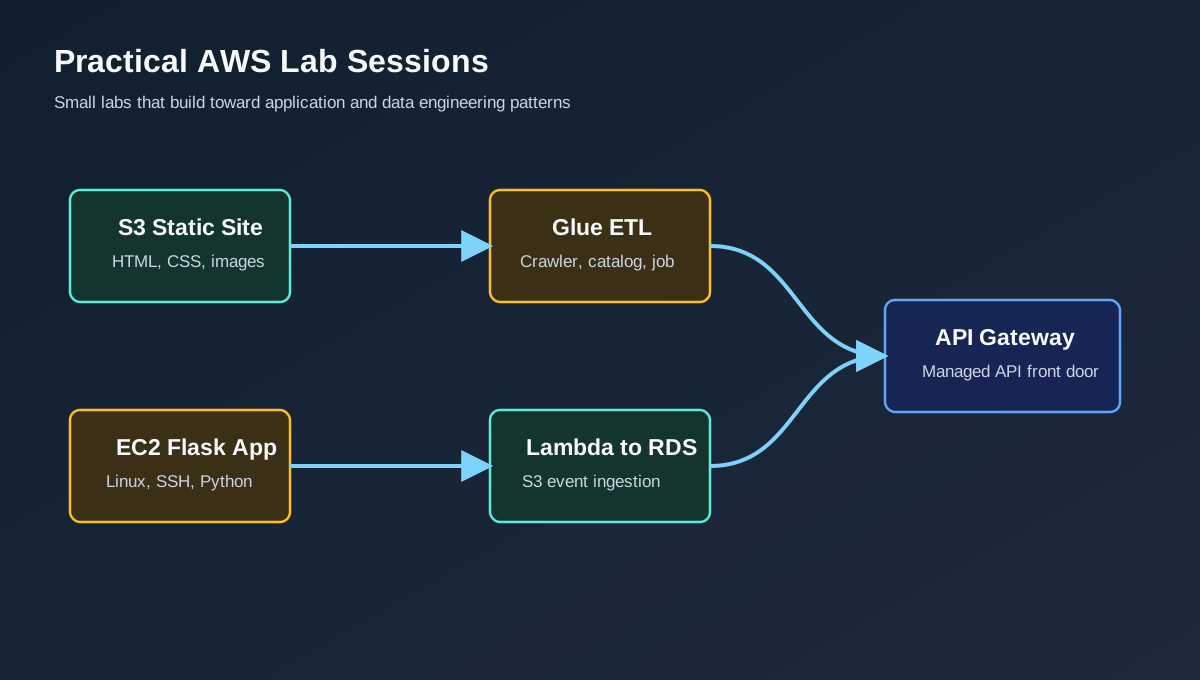 A set of small AWS labs can be combined into larger application and data engineering patterns
These labs are designed for learning. Use test data, avoid real secrets, restrict public access, and delete resources when finished.
Lab 1: Host a Static Website on Amazon S3
The first lab is a simple static website hosted from an S3 bucket. This is a good introduction to buckets, objects, public access settings, bucket policies, website endpoints, and the difference between object storage and a web server.
Goal
Create an S3 bucket, upload static files, enable static website hosting, and open the generated website endpoint in a browser.
Architecture
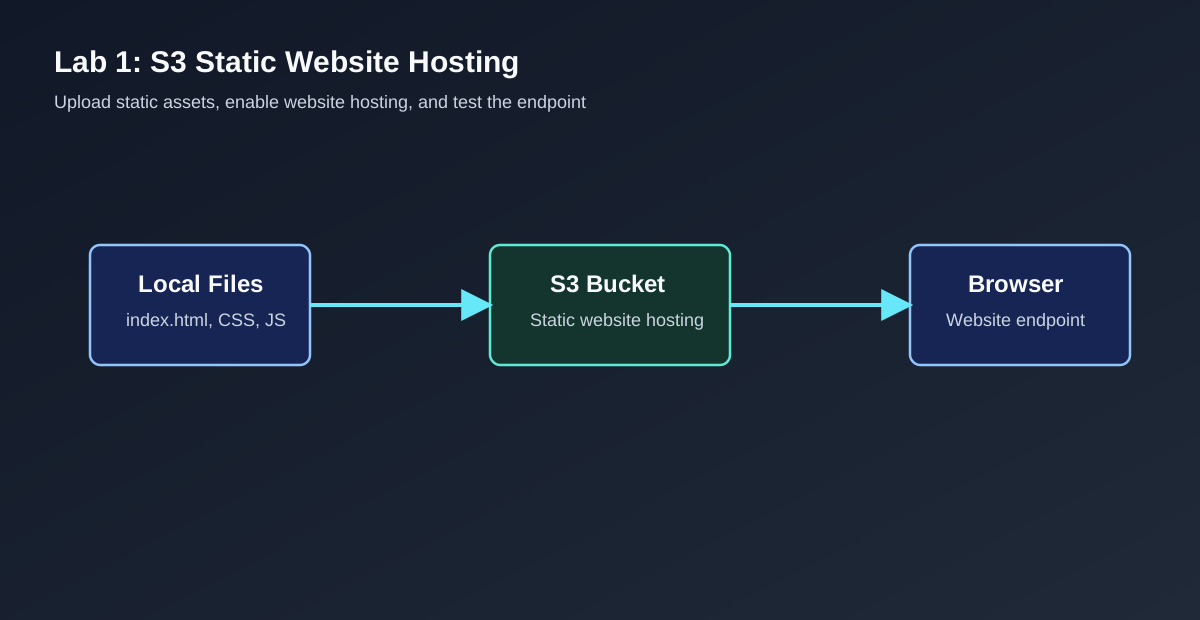 Static files are uploaded to S3 and served through the S3 website endpoint
Steps
- Create an S3 bucket with a globally unique name.
- Upload static files such as
index.html,error.html, CSS, JavaScript, and images. - Enable Static website hosting in the bucket properties.
- Set
index.htmlas the index document. - Optionally set
error.htmlas the error document. - Configure access so the intended files can be read by website visitors.
- Open the S3 website endpoint and verify the page loads.
For a small learning lab, the bucket can be made public with a tightly scoped read-only bucket policy for the website objects. For a more production-like pattern, put Amazon CloudFront in front of S3 and keep the bucket private.
Key Lessons
- S3 stores objects, not server-side application code.
- Static website hosting is useful for HTML, CSS, JavaScript, and images.
- S3 website endpoints use website hosting behavior, including index and error documents.
- Public bucket access should be deliberate and minimal.
- CloudFront is the better front door when HTTPS, caching, custom domains, and private bucket access are required.
Cleanup
Delete uploaded objects, disable public access changes that were only used for the lab, and remove the bucket if it is no longer needed.
Lab 2: Deploy a Simple Flask App on Amazon EC2
The second lab introduces EC2 as a virtual server. Instead of using a managed application platform, we launch a Linux instance, connect with SSH, install Python packages, run a Flask app, and expose the app through a security group rule.
Goal
Launch an EC2 instance, connect to it, install Python and Flask, run a small web application, and access it from a browser.
Steps
- Open the EC2 console and choose Launch instance.
- Select an Amazon Linux AMI or another Linux distribution.
- Choose a small instance type for the lab.
- Create or select an SSH key pair.
- Configure networking in a VPC and public subnet.
- Add a security group rule for SSH from your IP address.
- Add a second inbound rule for the Flask app port, such as
5000, only from your IP for testing. - Launch the instance and wait until status checks pass.
- Connect using SSH:
1
ssh -i key-pair-name.pem ec2-user@public-dns-name
On Amazon Linux, install Python and Flask:
1
2
3
sudo yum update -y
sudo yum install python3 python3-pip -y
python3 -m pip install flask pandas
Create a basic app.py:
1
2
3
4
5
6
7
8
9
10
from flask import Flask, jsonify

app = Flask(__name__)

@app.route("/")
def home():
    return jsonify({"message": "Hello from Flask on EC2"})

if __name__ == "__main__":
    app.run(host="0.0.0.0", port=5000)
Run the application:
1
python3 app.py
Then open:
1
http://public-dns-name:5000/
Key Lessons
- EC2 gives us operating system access and server-level control.
- Security groups act like virtual firewalls.
- SSH access should be restricted to trusted IP ranges.
- A Flask development server is fine for a lab, but production needs a real web server setup such as Gunicorn behind Nginx or a managed service.
- Public DNS and public IPv4 addresses can change when an instance is stopped and started unless an Elastic IP is used.
Cleanup
Terminate the EC2 instance when the lab is complete. Also delete unused key pairs, security groups, and Elastic IP addresses if any were created.
Lab 3: Build an AWS Glue ETL Pipeline
The third lab moves into data engineering. We place raw files in S3, use an AWS Glue crawler to infer schema, store metadata in the Glue Data Catalog, run an ETL job, and write curated output back to S3 in Parquet format.
Goal
Create a basic data lake pipeline that converts raw CSV data into query-friendly Parquet output.
Architecture
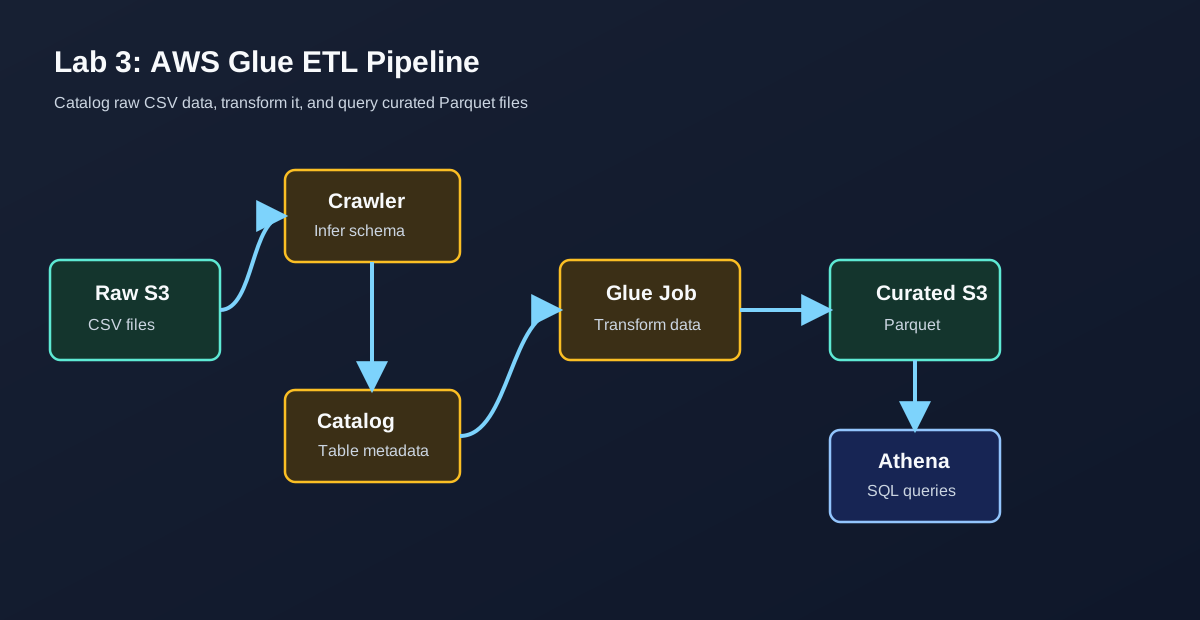 Glue crawlers catalog raw data, Glue jobs transform it, and Athena queries curated output
S3 Layout
A clean lab bucket can use separate prefixes:
1
2
3
4
5
6
7
8
9
s3://example-aws-lab/
  raw/
    customers/
      dataload=2025-01-01/
        customers.csv
  scripts/
  temp/
  curated/
    customers/
Steps
- Create an S3 bucket for the lab.
- Upload a sample CSV file into the
raw/prefix. - Create an IAM role for Glue with access to the lab bucket, CloudWatch Logs, and the Glue Data Catalog.
- Create a Glue database, such as
customer_database. - Create a crawler that points to the raw S3 prefix.
- Run the crawler and confirm that it creates a table in the Data Catalog.
- Create a Glue ETL job that reads from the catalog table.
- Map or rename fields as needed.
- Write the output to the
curated/prefix in Parquet format. - Crawl the curated prefix or manually create a table for it.
- Query the curated table from Athena.
Example Glue Job Shape
1
2
3
4
5
6
7
8
9
10
11
12
13
14
15
16
17
18
19
20
21
22
23
24
25
26
27
28
29
30
31
32
33
34
35
36
37
38
39
import sys
from awsglue.context import GlueContext
from awsglue.job import Job
from awsglue.transforms import ApplyMapping
from awsglue.utils import getResolvedOptions
from pyspark.context import SparkContext

args = getResolvedOptions(sys.argv, ["JOB_NAME", "OUTPUT_PATH"])

sc = SparkContext()
glue_context = GlueContext(sc)
job = Job(glue_context)
job.init(args["JOB_NAME"], args)

source = glue_context.create_dynamic_frame.from_catalog(
    database="customer_database",
    table_name="customers",
)

mapped = ApplyMapping.apply(
    frame=source,
    mappings=[
        ("customer_id", "string", "customer_id", "string"),
        ("email", "string", "email", "string"),
        ("dataload", "string", "dataload", "string"),
    ],
)

glue_context.write_dynamic_frame.from_options(
    frame=mapped,
    connection_type="s3",
    connection_options={
        "path": args["OUTPUT_PATH"],
        "partitionKeys": ["dataload"],
    },
    format="parquet",
)

job.commit()
Key Lessons
- Glue crawlers infer schema and populate the Data Catalog.
- The Data Catalog stores metadata; the data stays in S3.
- Parquet is usually better than CSV for analytics workloads.
- Partitioning helps query engines skip irrelevant data.
- Glue job scripts should use parameters instead of hardcoded bucket paths.
Cleanup
Delete Glue jobs, crawlers, temporary files, test output, and the S3 bucket if it is no longer required.
Lab 4: Load S3 CSV Data into Amazon RDS with AWS Lambda
This lab connects storage, serverless compute, and a relational database. A CSV file is uploaded to S3, S3 sends an event to Lambda, Lambda reads the file, and selected rows are inserted into an Amazon RDS database.
Goal
Create a simple event-driven ingestion flow from S3 to RDS.
Architecture
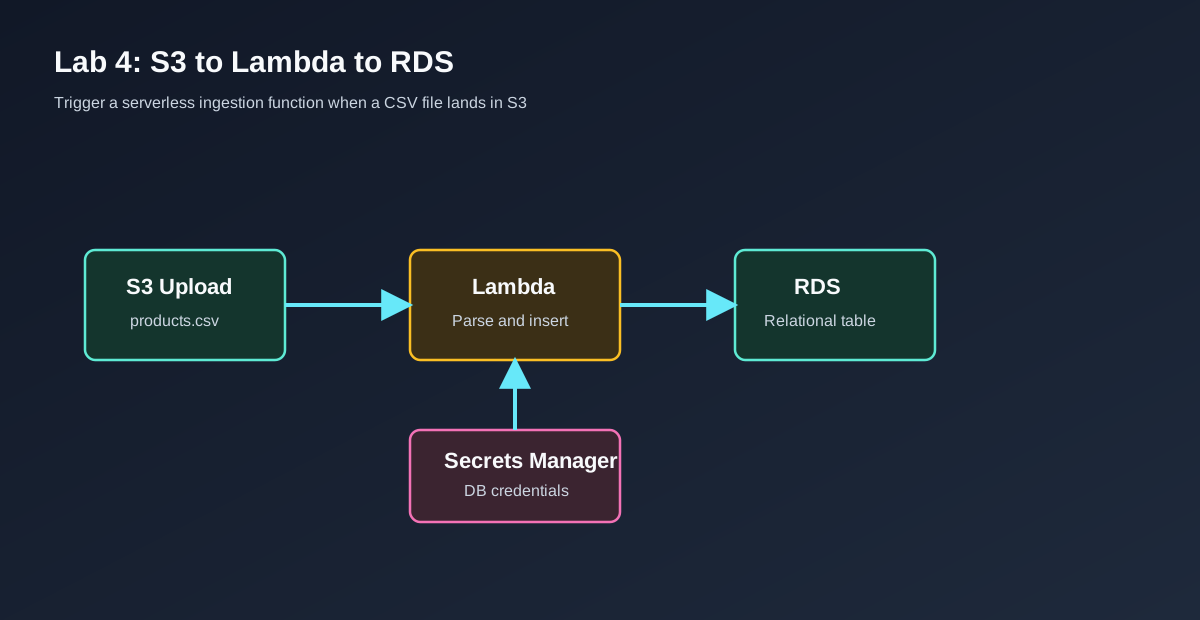 S3 object events invoke Lambda, and Lambda inserts parsed CSV data into RDS
Steps
- Create an RDS for MySQL database for this lab example.
- Store database credentials in AWS Secrets Manager or another secure configuration mechanism.
- Create an S3 bucket for incoming CSV files.
- Create a Lambda function with an execution role that can read the S3 bucket and read the secret.
- Place the Lambda function in the correct VPC and subnet configuration if the RDS database is private.
- Allow database inbound traffic from the Lambda security group.
- Add an S3
ObjectCreatedtrigger to the Lambda function. - Upload a sample CSV file.
- Verify Lambda logs in CloudWatch.
- Query the RDS table to confirm the insert worked.
Safer Lambda Example
The Notion lab used the right general flow, but a production-quality version should not hardcode the database host, username, or password in the function. Use environment variables for non-secret configuration and Secrets Manager for credentials.
1
2
3
4
5
6
7
8
9
10
11
12
13
14
15
16
17
18
19
20
21
22
23
24
25
26
27
28
29
30
31
32
33
34
35
36
37
38
39
40
41
42
43
44
45
46
47
48
49
50
51
52
53
54
55
56
57
58
59
60
61
62
63
64
65
66
67
68
69
70
71
72
73
74
75
76
77
78
import csv
import io
import json
import os

import boto3
import pymysql

s3_client = boto3.client("s3")
secrets_client = boto3.client("secretsmanager")

def get_secret():
    response = secrets_client.get_secret_value(
        SecretId=os.environ["DB_SECRET_ARN"]
    )
    return json.loads(response["SecretString"])

def lambda_handler(event, context):
    secret = get_secret()

    bucket = event["Records"][0]["s3"]["bucket"]["name"]
    key = event["Records"][0]["s3"]["object"]["key"]

    if not key.endswith(".csv"):
        return {"statusCode": 200, "body": "Skipped non-CSV file"}

    obj = s3_client.get_object(Bucket=bucket, Key=key)
    body = obj["Body"].read().decode("utf-8")
    rows = csv.DictReader(io.StringIO(body))

    connection = pymysql.connect(
        host=os.environ["DB_HOST"],
        user=secret["username"],
        password=secret["password"],
        database=os.environ["DB_NAME"],
        connect_timeout=5,
    )

    try:
        with connection.cursor() as cursor:
            cursor.execute(
                """
                CREATE TABLE IF NOT EXISTS first_10_products (
                  product_id VARCHAR(50) PRIMARY KEY,
                  product_brand VARCHAR(255),
                  category VARCHAR(255),
                  sub_category VARCHAR(255)
                )
                """
            )

            for index, row in enumerate(rows):
                if index >= 10:
                    break

                cursor.execute(
                    """
                    INSERT INTO first_10_products
                      (product_id, product_brand, category, sub_category)
                    VALUES (%s, %s, %s, %s)
                    ON DUPLICATE KEY UPDATE
                      product_brand = VALUES(product_brand),
                      category = VALUES(category),
                      sub_category = VALUES(sub_category)
                    """,
                    (
                        row["product_id"],
                        row["product (brand)"],
                        row["category"],
                        row["sub_category"],
                    ),
                )

        connection.commit()
    finally:
        connection.close()

    return {"statusCode": 200, "body": f"Processed s3://{bucket}/{key}"}
Key Lessons
- S3 can invoke Lambda when objects are created.
- Lambda can connect to RDS, but networking and security groups must be correct.
- Secrets should not be hardcoded in source code.
- The Lambda function should be idempotent because events can be retried.
- For larger files, avoid reading the entire CSV into memory; use streaming, chunking, Glue, or another data processing pattern.
Cleanup
Delete the Lambda function, S3 test bucket, RDS instance, Secrets Manager secret, and security groups created only for the lab.
Lab 5: Expose a Backend with Amazon API Gateway
The final lab introduces API Gateway as a managed API front door. API Gateway can expose Lambda functions or HTTP backends through managed routes, stages, throttling, authorization, and monitoring.
Goal
Create an API endpoint that forwards requests to a backend integration, usually Lambda for a beginner lab.
Steps
- Create a Lambda function with a simple handler.
- Create an API Gateway HTTP API or REST API.
- Add a route such as
GET /health. - Connect the route to the Lambda integration.
- Deploy the API to a stage.
- Invoke the generated API endpoint from a browser, curl, or Postman.
- Check logs and metrics.
Example Lambda handler:
1
2
3
4
5
6
7
8
import json

def lambda_handler(event, context):
    return {
        "statusCode": 200,
        "headers": {"Content-Type": "application/json"},
        "body": json.dumps({"status": "ok", "service": "aws-lab-api"}),
    }
Key Lessons
- API Gateway gives Lambda a stable HTTP endpoint.
- Routes define how HTTP methods and paths map to integrations.
- Stages separate environments such as dev, test, and production.
- Authorization, throttling, CORS, and logging should be configured intentionally.
- API Gateway is often the public entry point for serverless applications.
Cleanup
Delete the API, stage, Lambda function, CloudWatch log groups, and IAM roles that were created only for the lab.
Final Checklist for AWS Labs
Before calling any AWS lab complete, check the following:
- The application or pipeline works end to end.
- Security groups are not open wider than necessary.
- S3 buckets are not public unless the lab specifically requires it.
- Secrets are not committed to code or pasted into documentation.
- Logs are reviewed for errors.
- Cost-generating resources are deleted.
- Any reusable scripts are saved in source control.
Summary
These practical labs cover a useful path through AWS fundamentals. S3 teaches object storage and static hosting. EC2 teaches virtual servers and networking. Glue teaches data cataloging and ETL. Lambda with RDS teaches event-driven ingestion. API Gateway teaches how to expose backend functionality as an HTTP API.
Together, they form a small but realistic foundation for building cloud applications and data workflows on AWS.
Source Notes
Based on my Notion lab table: AWS.